What Is Ahrefs? Features, Pricing and How It Helps Link Building
Ahrefs is an SEO toolset for finding, checking and tracking backlinks, with plans from $29/month. This overview covers its link building features, pricing and when to skip it.
Ahrefs is an SEO toolset that helps you find, check and track backlinks. Ahrefs says it has crawled the web 24/7 since 2010 and calls its crawler the world's second-most active. It fits SEO freelancers, agencies, SaaS marketers and site owners who build links as a regular part of their work.
This overview explains what it does for link building, what it costs, and when you can skip it.
TL;DR
- Ahrefs is an SEO toolset for backlink research, with paid plans from $29/month (Starter) to $1,499/month (Enterprise), and no free trial.
- Site Explorer, Link Intersect, Content Explorer and Alerts cover most regular link building jobs in one place.
- A 3-person team on Standard pays $369/month, so cost grows fast when you add users.
- If you buy only a handful of guest posts a month, Ahrefs Free plus a marketplace may be enough.
Quick facts
| Fact | Detail |
|---|---|
| What it does | SEO toolset for backlink research, competitor checks and link tracking |
| Best for | SEO freelancers, agencies, SaaS marketers and site owners who build links regularly |
| Starting price | $29/month (Starter) |
| Free option | Ahrefs Free, with limited Site Explorer and Site Audit |
| Website | ahrefs.com |
| Checked | November 2026 |
What Ahrefs does for link building
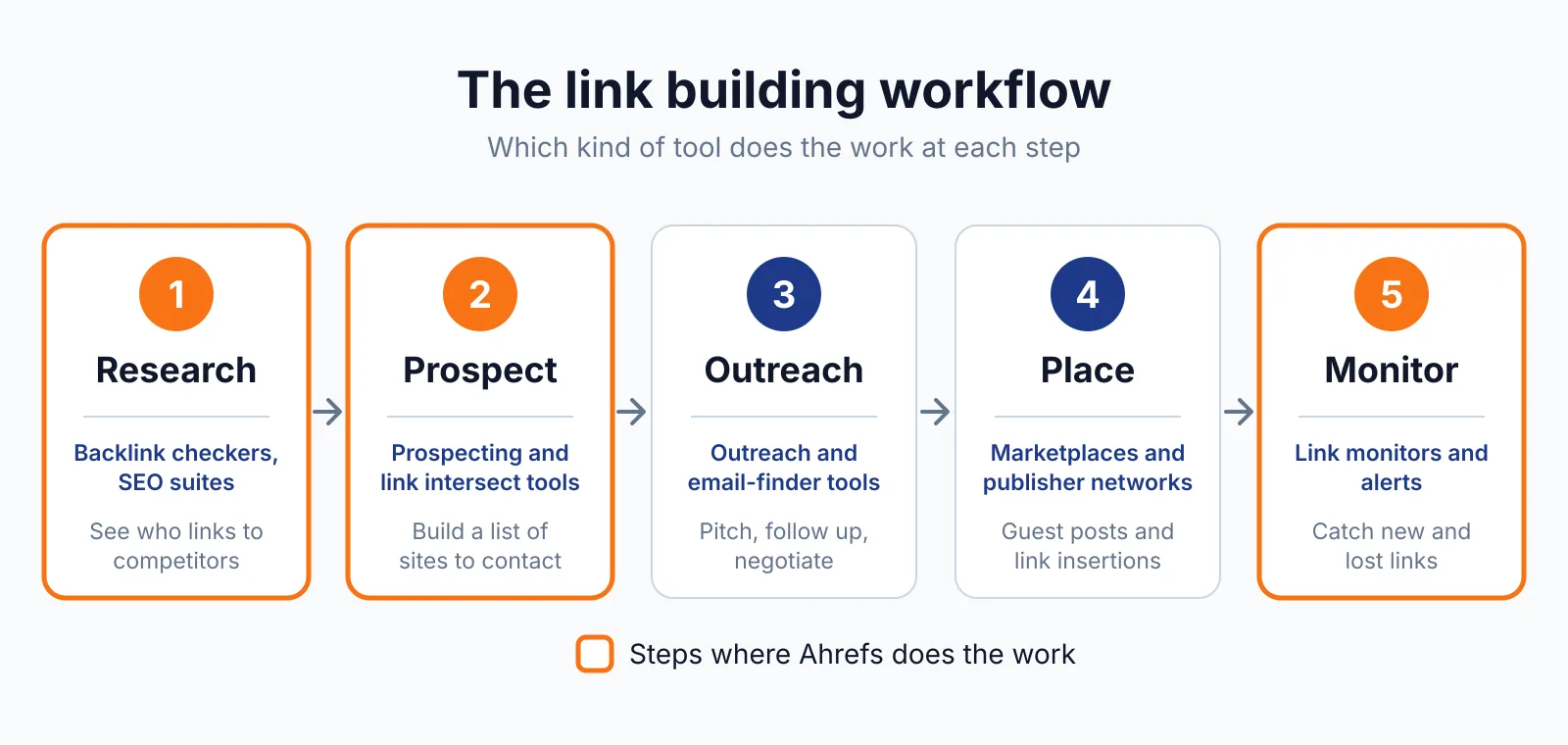
The jobs below use four parts of Ahrefs: Site Explorer, Link Intersect, Content Explorer and Alerts. Each one answers a direct question about links, and each has a limit you should know before you pay.
See who links to any competitor
You enter a competitor's domain in Site Explorer and see its backlinks and referring domains. A referring domain is one website that links to a site, even if it links more than once.
A site that already links to a competitor has shown it will link to content like yours, so your outreach list starts with warm targets instead of cold guesses.
For example, if three SaaS competitors all get links from the same industry blog, that blog is a realistic target, and you can read the exact pages it linked to before you write.
The limit: a link in the list does not mean the site will link to you, and it does not tell you whether the site accepts guest posts or what a placement costs. Our backlink pricing database covers that side.
Find sites that link to several competitors but not you
Link Intersect shows the sites that link to two or more of your competitors and do not link to you. A site that links to several competitors has a clear interest in your topic, so one good page on your site can be enough reason for one more link.
For example, if two competitors both have a link from the same resource page and your page covers the topic in more depth, you can contact the site owner and point to your page as a useful addition. The limit: the list is only as good as the competitors you enter.
If they cover very different topics, the shared list will be short.
Find broken backlinks to reclaim
Site Explorer shows broken backlinks: links that point to a page on your site that no longer exists or no longer loads. Here you reclaim a link you already earned, without finding a new site or writing a new pitch.
For example, if a blog links to an old page you removed, you can restore that page or ask the site owner to point the link to your current page on the same topic. The limit: Ahrefs only shows you the broken link. You still need to fix the page or contact the site owner.
Find linkable content and outreach targets
Content Explorer finds content on a topic that has already earned links, so you can see what other sites choose to link to. Link building works better when you start from a topic that already attracts links than from a page you hope will.
For example, if a guide on a topic you cover has links from many sites, you can publish a clearer, more current version and contact those same sites with a direct reason to look at it. The limit: a popular topic does not guarantee links.
You still need a page worth linking to and a short outreach note that explains why it helps their readers.
Get alerts for new and lost backlinks
Alerts tell you when your site gains or loses a backlink, so you can act while the change is fresh. A lost link from a useful site is easier to fix soon after it disappears, and a new link is a chance to thank the site owner and keep a contact for later.
For example, if a link from a partner site disappears after a page update, you can check the page, find what changed, and ask for the link back. The limit: an alert tells you a link changed, not why the page changed or whether the owner will restore it.
Ahrefs pricing
Ahrefs costs $29 to $449 a month on its listed plans, and Enterprise starts at $1,499 a month. Prices below are monthly billing from ahrefs.com/pricing, checked in November 2026. Annual billing saves up to 17%. There is no free trial, and Ahrefs says it does not run discounts.
| Plan | Monthly price | Extra user |
|---|---|---|
| Starter | $29/month | Not stated |
| Lite | $129/month | $40 each, up to 2 extra users |
| Standard | $249/month | $60 each, up to 5 extra users |
| Advanced | $449/month | $80 each, up to 10 extra users |
| Enterprise | From $1,499/month | Not stated |
Lite users give up history and limits: 6 months of history and 1,000 credits per user per month. A 3-person team on Standard pays $369/month ($249 + 2 × $60).
Where Ahrefs fits in a link building workflow
- Pick two or three close competitors and check their backlinks and referring domains in Site Explorer, so you see which sites link in your niche and which pages they link to.
- Run Link Intersect on those competitors to build a short list of sites that link to several of them but not to you, then sort it by relevance to your page before you write to anyone.
- Check your own broken backlinks in Site Explorer and look for linkable topics in Content Explorer, so you fix lost links first and then plan content with a clear reason to earn links.
- Set up Alerts for new and lost backlinks and track your target keywords in Rank Tracker, so you can follow up while a change is still fresh.
Ahrefs does not do the outreach or the placement steps for you. For those you need an outreach tool, a marketplace or a link building outreach service. If you pay for any placement, Google's link spam policy asks that paid links carry rel="sponsored" or rel="nofollow".
Pick Ahrefs if
- You build links every week and need regular competitor and backlink checks.
- You work for clients (see our white label link building) or a SaaS site and need to show where links come from and where they were lost.
- You need more than the Lite limits: more than 6 months of history, more than 750 tracked keywords, or more than 1,000 credits per user per month.
- You want Site Explorer, Link Intersect, Content Explorer, Alerts, Keywords Explorer, Site Audit and Rank Tracker in one tool.
Not a fit if
- You only buy a handful of guest posts a month. A marketplace plus Ahrefs Free may be enough.
- You need a free trial before you pay. Ahrefs has none.
- You only need a quick check of a few links, which Ahrefs Free or our free backlink checker can cover.
- You need long history or high row limits, but Advanced at $449/month or Enterprise from $1,499/month is beyond your budget.
Alternatives
If Ahrefs does not fit, compare these on your own list of jobs rather than on brand names.
| Tool | Why people switch | Pricing |
|---|---|---|
| Semrush | A different plan may fit their budget better | Check current pricing on their site |
| Moz Pro | Simpler UI for a lighter daily workflow | Check current pricing on their site |
| Majestic | Link-only data, without the other SEO tools | Check current pricing on their site |
| SE Ranking | Lower monthly cost | Check current pricing on their site |
FAQ
Is Ahrefs Free enough for link building?
Ahrefs Free gives you limited Site Explorer and Site Audit. That is enough for a quick check of a few links or a first look at a competitor, and it can work alongside a marketplace if you buy only a few guest posts a month. It is not enough for regular outreach lists, large exports or daily tracking.
Does Ahrefs show every backlink?
No tool does. Ahrefs shows the backlinks in its own index, based on the part of the web it has crawled. Use its list to compare sites and find targets, don't treat a missing link as proof the link doesn't exist, and check any key link on the live page before you act on it.
How often is backlink data updated?
According to Ahrefs' help center, its live backlink index gets fresh data every 15 to 30 minutes, while a full refresh of the whole database takes about two months. High-rated pages get recrawled far more often than low-rated ones, so a new link on a small site can take a while to show up.
For your own site, Alerts will tell you when a link appears or disappears.
Can Ahrefs find link opportunities for me automatically?
It gives you lists of opportunities through Link Intersect, Content Explorer and Site Explorer, and Alerts tell you when links change. It does not pick your targets, write your outreach or place links, so you still choose the sites, check each page and contact the owners yourself.
Next step
Try our free SEO tools, or check what links cost in your niche with the backlink price checker. If you would rather have someone plan the links for you, contact us for a free backlink plan: tell us your site, your competitors and your monthly budget, and we will send you a plan you can use.

The BacklinkPrice Team researches backlink prices, publisher sites and link building tools. We check prices and plans against each provider's own pages and date them, so you know how current the numbers are.
More from BacklinkPrice TeamRelated guides