What Is BuzzSumo? Features, Pricing and How It Helps Link Building
BuzzSumo finds the content in your niche that earned the most links and shares, and the people who shared it. Plans start at $199 a month on yearly billing.
BuzzSumo is a content research and media monitoring tool that shows which articles earned the most links and shares in your niche. It is not a backlink index in the usual sense, and it does not run outreach for you.
It is built for content teams, PR teams and link builders who start from content that already works, then pitch the people who shared it.
TL;DR
- BuzzSumo plans start at $199 a month on yearly billing for Content Creation, and go to $999 a month for Enterprise.
- Its archive covers 8 billion articles from 42 million websites, as stated on its own site.
- Backlink alerts tell you by email, Slack or RSS when a domain or URL gains a new link.
- Searches are unlimited on every plan, while users range from 1 to 30 across plans.
Quick facts
| Fact | Detail |
|---|---|
| What it does | Finds content that earns links and shares, and the people who share it |
| Best for | Content, PR and link building teams who pitch from proven content |
| Starting price | $199 a month billed yearly for Content Creation |
| Free option | No free plan stated on the pricing page; a trial is offered, check current terms on their site |
| Website | buzzsumo.com |
| Checked | November 2026 |
What BuzzSumo does for link building
Find content that already earned links in your niche
BuzzSumo Content Analyzer lets you search a topic, domain or URL and see the articles with the most social engagement and backlinks. A referring domain is one website that links to you, even if it links from several pages, and this report shows which pages earned the most referring domains in your niche.
That view matters because a topic that earned 40 links last year is a safer bet than a topic no one linked to. You can filter by date, content type and domain, then build a short list of pages worth beating with a better guide, a fresher data set or a clearer example.
For example, a SaaS team that sells invoicing software can search for invoicing guides, sort by backlinks, and find that a 2024 guide with a free template earned 60 links from accounting blogs. The team can then build a better template, add current tax rates, and pitch the same sites with a clear reason to link.
The limit is that BuzzSumo shows past success, not future demand, and a topic that earned links last year may be stale now. You still need to check if the linking sites are still active, and if your page is a clear improvement, not a copy.
See which pages earned the most links for any site
BuzzSumo Backlinks report shows backlinks for a domain or URL, and it shows which content earned the most links. That report matters because it tells you where a rival gets its links from.
You can open a rival domain, sort its content by backlinks, and see if most links point to a free tool, a data study or a how-to guide. That pattern tells you what to build next, and it tells you which format your audience links to most.
For example, a link builder for a fitness brand can check a rival site and find that its calorie calculator earned 120 links, while its blog posts earned 5 each. The builder can then pitch a better calculator, or a new tool that solves a related problem, to the same sites.
The limit is that BuzzSumo is not a full backlink index, so it will not show every link to a site, and it will not replace a dedicated link index for a full audit. Use it to find content patterns, then check a link profile in our free backlink checker before you build a list.
Get alerts when a rival gains a new link
BuzzSumo backlink alerts notify you when a domain or URL gains a new backlink, and alerts can arrive by email, Slack or RSS. That alert matters because a new link to a rival often means a new article, a new list or a new roundup, and you can pitch the same site while the topic is fresh.
You can set alerts for your own site too, so you know when a new link goes live and you can thank the author or check that the link is correct.
Alerts are limited by plan, with 2 on Content Creation, 5 on PR and Comms, 10 on Suite and 50 on Enterprise, so a small team needs to pick its most important rivals.
For example, a team that tracks three rivals can set an alert for each one, and when one rival gains a link from a new industry list, the team can email the list owner the same day with a better resource.
The limit is that an alert tells you a link exists, not why it was given, and you still need to open the page and read the context before you pitch. A link in a footer or a paid placement needs a different pitch from a link in a guide.
Find the people who shared content like yours
BuzzSumo finds sharers, influencers, authors and journalists for a topic, and it shows top authors and media contacts for outreach. That list matters because a person who shared a rival guide last month is more likely to share yours than a cold contact with no history on the topic.
You can filter by role, location and reach, then build a short list of 20 to 50 people who already care about your niche. PR and Comms plans allow 100 journalists per list, and Suite allows 600, while Content Creation allows 20, so the plan you pick changes how large your media list can be.
For example, a digital PR team can search for a topic, find the 30 authors who shared the top three guides, and pitch them a new data study with a chart they can use. That pitch is warmer than a mass email, and it gives each author a clear reason to reply.
Our digital PR service uses the same approach when it plans a campaign around new data.
The limit is that a share is not a promise to link, and many sharers will not reply to a pitch, even when the topic fits. You need a short, clear email, a real reason to link, and a follow-up plan, and our free email generator can help you draft that first message.
Track trends and questions your audience asks
BuzzSumo Trending Feeds show popular content from the past 24 hours, and Question Analyzer pulls questions from Amazon, Reddit, Quora and other question sites. That view matters because a question that appears often is a sign of demand, and a page that answers it well can earn links from forums, guides and help pages.
You can use those questions to plan a guide, a FAQ page or a tool that solves the problem, then pitch it to sites that already link to similar answers. History ranges from 2 years on Content Creation to 5 years on Suite and Enterprise, so a higher plan lets you see longer trends.
For example, a team that sells project software can find 20 questions about remote team check-ins, build a guide with templates, and pitch it to blogs that link to older check-in guides.
The limit is that trends move fast, and a 24-hour feed can push you toward news that fades in a week. Use trends for ideas, then check search demand and link patterns before you spend a month building a page.
BuzzSumo pricing
BuzzSumo pricing starts at $199 a month billed yearly for Content Creation, and goes to $299 a month billed yearly for PR and Comms, $499 a month billed yearly for Suite, and $999 a month for Enterprise on annual billing only.
The pricing page says pay annually and save 20%, with yearly savings of $478 on Content Creation, $718 on PR and Comms, and $1198 on Suite. Monthly-billing prices were not shown in the fetched text, so state the billing term clearly and check current terms on the BuzzSumo pricing page. The API is quote-only, so contact sales for that price.
A worked example helps: Suite at $499 a month billed yearly costs $5988 a year, and it covers 10 users, 10 alerts, 5 years of history and 600 journalists per list. Content Creation at $199 a month billed yearly costs $2388 a year for 1 user, 2 alerts and 2 years of history.
Compare it with Morningscore pricing and SE Ranking pricing, and use our backlink pricing database before you agree a fee.
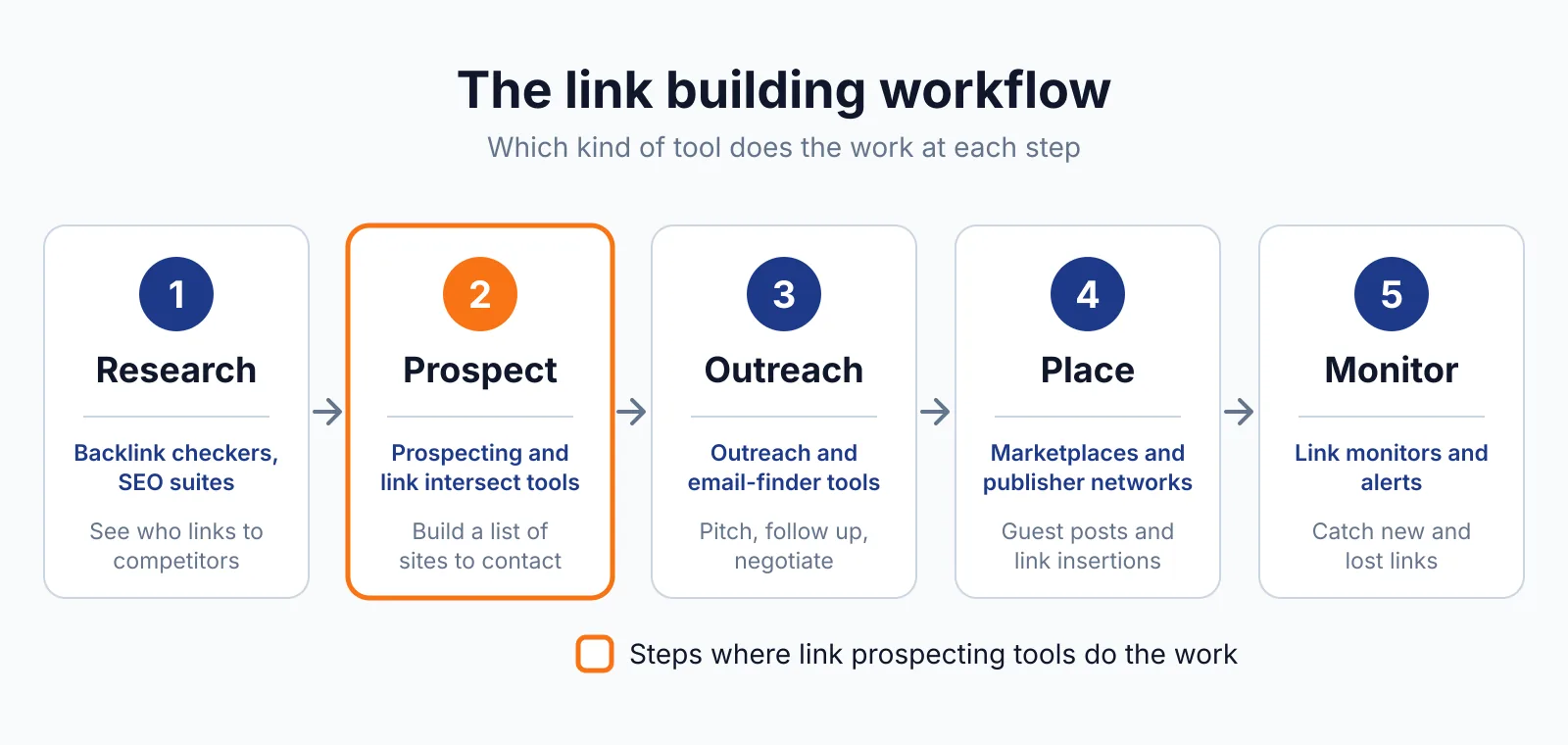
Where BuzzSumo fits in a link building workflow
- Search a topic in Content Analyzer and sort the results by backlinks to find the angles that earned links.
- Open the Backlinks report for the top pages and note which sites linked, and which format earned the most links.
- Build a better page, tool or data study that improves on the top result, and check the price of a placement in our price checker if you plan to pay for a link.
- Find sharers, authors and journalists in BuzzSumo, build a short pitch list, and send a clear email with a reason to link.
- Set backlink alerts for your page and for rivals, so you know when a new link goes live and when a rival gains a link you can chase.
BuzzSumo does not cover outreach sending, link tracking after a placement, or a full backlink audit, so you still need a link index and a tracker for those steps.
Pick BuzzSumo if
- You plan content from proven link patterns, not from guesses
- You want backlink alerts for rivals and your own site
- You need sharer and journalist lists for digital PR
- You want unlimited searches on every plan
Not a fit if
- You need a full backlink index for a complete link audit
- You need built-in outreach and email sending in the same tool
- You want a free plan or a trial length stated on the pricing page
- You only need a one-off backlink check for a single site
Alternatives
| Tool | Why people switch | Pricing |
|---|---|---|
| Semrush | Wider SEO suite with a dedicated link building tool and outreach | Check current pricing on their site |
| Majestic | Deeper link index with Trust Flow and Citation Flow | Check current pricing on their site |
| Ahrefs | Larger backlink index and full site audit in one tool | Check current pricing on their site |
| Morningscore | Simpler prices and daily new and lost link updates | Check current pricing on their site |
FAQ
Does BuzzSumo show every backlink to a site?
No, BuzzSumo shows backlinks for a domain or URL and which content earned the most links, but it is not a full backlink index. Use it to find content patterns and alerts, then check a full profile with a link index tool.
Google explains that links bought or sold for ranking purposes can breach its spam policies, so keep your outreach focused on relevant sites.
How long is the BuzzSumo trial?
The trial length is not stated on the opened pricing page, so do not rely on a number you see in a roundup. A trial is offered, and you should check current terms on the BuzzSumo site before you start. Our free SEO tools can help you do a first check while you decide.
Can BuzzSumo help with link insertion work?
Yes, it can show which existing pages earned links and who shared them, which helps you find pages worth a link insertion pitch. A niche edit is a link placed inside an existing page, rather than in a new post, and BuzzSumo can show you which pages already attract links in your niche.
Our SaaS link building service explains how that work is planned for software sites.
Next step
Search one topic you want to rank for, sort by backlinks, and note the top three pages and their linking sites. Then use our free SEO tools to narrow your list, and contact us if you want help turning that research into links.

The BacklinkPrice Team researches backlink prices, publisher sites and link building tools. We check prices and plans against each provider's own pages and date them, so you know how current the numbers are.
More from BacklinkPrice TeamRelated guides