What Is Featured.com? Features, Pricing and How It Helps Link Building
Featured.com is an AI co-pilot for PR that finds journalist requests, podcasts, and speaking slots, drafts the pitch, and sends it through your own email or Slack.
Featured.com is an AI co-pilot for PR that helps PR professionals, founders, and subject-matter experts find and win earned media. It covers journalist requests, podcast interviews, bylined articles, speaking slots, awards, and creator partnerships, plus AI-visibility audits that show how chat tools describe your brand.
It suits teams who want press coverage and the earned links that come with it, without running every search by hand.
TL;DR
- Paid individual plans start at $29 a month billed annually, with a free plan to start, and every plan includes every PR tool, differing only in daily AI usage.
- Featured owns HARO and Connectively, so it sees their journalist requests the moment they are posted, alongside Substack, X, and LinkedIn.
- Links from coverage are earned, not bought: a picked quote usually brings a name, title, and company credit, and often a link, but no link is guaranteed.
Quick facts
| Fact | Detail |
|---|---|
| What it does | AI co-pilot for PR: finds journalist requests, podcasts, speaking slots, awards, and creator partnerships, and drafts and sends pitches |
| Best for | PR teams, founders, and experts who want earned media and the links that come with it |
| Starting price | $29 a month billed annually for Lite; free plan to start |
| Free option | Free plan with a small daily AI allowance; no credit card required |
| Website | featured.com |
| Checked | November 2026 |
What Featured.com does for link building
Find journalist requests the moment they post
Featured pulls journalist requests from HARO, Connectively, Substack, X, and LinkedIn into one place, and because it owns HARO and Connectively, it sees those requests the moment they are posted. You describe what you want in plain language in a chat interface, and Featured finds the matching opportunities.
That matters because reporter requests close fast, and a request seen an hour late is often a request already answered by someone else.
For example, a founder who types "I want to comment on small business lending" can see the matching HARO and Connectively requests in one feed, instead of checking two inboxes and three social feeds.
The limit is that the feed is only as good as your brief. A vague request such as "get me press" returns a wide mix of opportunities, and you still need to read each one and judge whether your expertise fits.
Win podcast, speaking, and byline slots from one place
Beyond journalist requests, Featured covers podcasts, with a database of 814,000 active podcasts, plus journalists and media lists, bylined articles, speaking opportunities, awards, creators and influencers, and media monitoring.
That range matters for link building because a podcast appearance, a bylined article, and a speaking slot each create a different kind of mention, and together they build a public record of expertise that reporters and site owners can check.
For example, an expert who appears on three podcasts in their niche can point to those episodes in the next journalist pitch, and the reporter sees a source who has already spoken clearly on the topic.
The limit is that none of these slots guarantees a link. A podcast may link the show notes, or it may not, and a bylined article may carry an author bio link or only a name. You win the slot first and check the link after.
Let the AI draft and send the pitch
Featured drafts the pitch for you and sends it through your connected Gmail, Outlook, or Slack account, so the pitch comes from your own address rather than a platform inbox. Workflows re-run the same search hourly, daily, weekly, or monthly and deliver only what is new, which means the system keeps watch while you do other work.
For example, you can set a workflow that checks hourly for journalist requests about ecommerce returns, and each morning you get only the new requests, with a draft pitch ready for each one. You edit the draft, add your number or your view, and send it from your Gmail account in a few minutes.
The limit is that an AI draft is a starting point, not a finished pitch. A draft that reads like a template gets ignored, and a pitch with no number, no clear view, and no real experience behind it will not beat a short human answer.
Check how AI search describes your brand
Featured runs GEO audits, which ask ChatGPT, Claude, Perplexity, and Gemini how they describe your brand, and show where you appear in AI answers and where you do not. That matters for link building because AI answers cite sources, and a brand that never appears in those answers is invisible in a growing share of search.
The audit shows which topics need coverage, so you can pitch the gaps instead of guessing.
For example, an audit may show that AI tools describe your firm well on pricing but never mention it on implementation, which tells you to pitch stories about implementation work and to publish a bylined article on that topic.
The limit is that an audit measures visibility, not links. A brand can appear in AI answers without a link, and the audit will not tell you which mentions carried a link back to your site.
Keep paid placements separate from earned media
Featured also lists paid placements, which are labelled as paid and kept separate from earned media. That separation keeps earned work clean: a quote won on merit is not mixed up with a slot that was bought.
For example, if a media outlet offers a paid placement alongside its journalist requests, Featured shows it as paid, and you can decide whether the spend is worth it on its own terms, rather than confusing it with a quote you earned.
The limit is that a paid placement is still a paid link under Google's rule, which says paid links need rel="sponsored" or rel="nofollow". Earned coverage is different from a bought link. A quote a reporter chose to use is not a paid placement, so the paid-link rule does not apply in the normal case.
A paid slot on the same platform is different again, and it needs the right label.
Featured.com pricing
Featured.com pricing runs from a free plan to $1,199 a month billed annually for Pro+, and every plan includes every PR tool, with plans differing only in daily AI usage.
The plan-card dollar amounts did not render in our direct open of the Featured.com pricing page, so the figures below come from consistent reads of the same page, and the conflict between them is flagged. The page itself confirms the shape: free to start, no credit card required, usage resets daily, and you can upgrade or downgrade anytime.
| Plan | Price | Key details |
|---|---|---|
| Free | $0 | Small daily AI allowance, enough for about 2 to 3 media opportunities a week in the company's own example; free Newsjacking tool |
| Lite | $29 a month billed annually ($348 a year) | Every PR tool, with a higher daily AI allowance than Free |
| Pro | $79 a month billed annually ($948 a year) | Every PR tool, with a higher daily AI allowance than Lite |
| Pro+ | $1,199 a month billed annually | Every PR tool, with the highest daily AI allowance |
| Team | Up to 25 seats | Team plans with shared access |
| Enterprise | Custom | Enterprise plans |
The price conflict to flag is this: October 2026 reads of the pricing page give Lite at $29 a month billed annually and Pro at $79 a month billed annually, with Pro+ at $1,199 a month billed annually in a Featured press release dated October 14, 2026.
The CEO's November 2026 podcast interview quotes $39 a month for Lite, $99 for Pro, and $299 for Pro+, and those appear to be monthly-billing rates, so the gap is monthly against annual billing. The annual-billing figures are used as primary above.
A worked example: Lite at the annual rate costs $348 a year, or $29 a month. At the $39 a month monthly-billing figure from the CEO interview, the same plan would cost $468 a year, so the annual plan saves about $120 a year. Team plans run up to 25 seats, and enterprise plans are custom.
For context, the two products Featured owns carry their own plans. HARO is free. Connectively runs a free tier with 3 submissions a month, Lite at $19 a month for 10 submissions, Pro at $49 a month for unlimited submissions, and Business at $99 a month for unlimited submissions plus API access.
Older pre-relaunch pricing is outdated and was not used.
Where Featured.com fits in a link building workflow
- Describe what you want in plain language and set up workflows that re-run the search hourly, daily, weekly, or monthly, so new opportunities reach you without manual checks.
- Review the matching journalist requests, podcasts, and speaking slots, and pitch the ones where your expertise is real, with a short answer and a number where you have one.
- Let Featured draft the pitch, edit it into your own voice, and send it from your connected Gmail, Outlook, or Slack account.
- When coverage runs, check the article or show notes for the credit and the link, and record which outlets linked and which only named you.
- Run a GEO audit and pitch the gaps it shows.
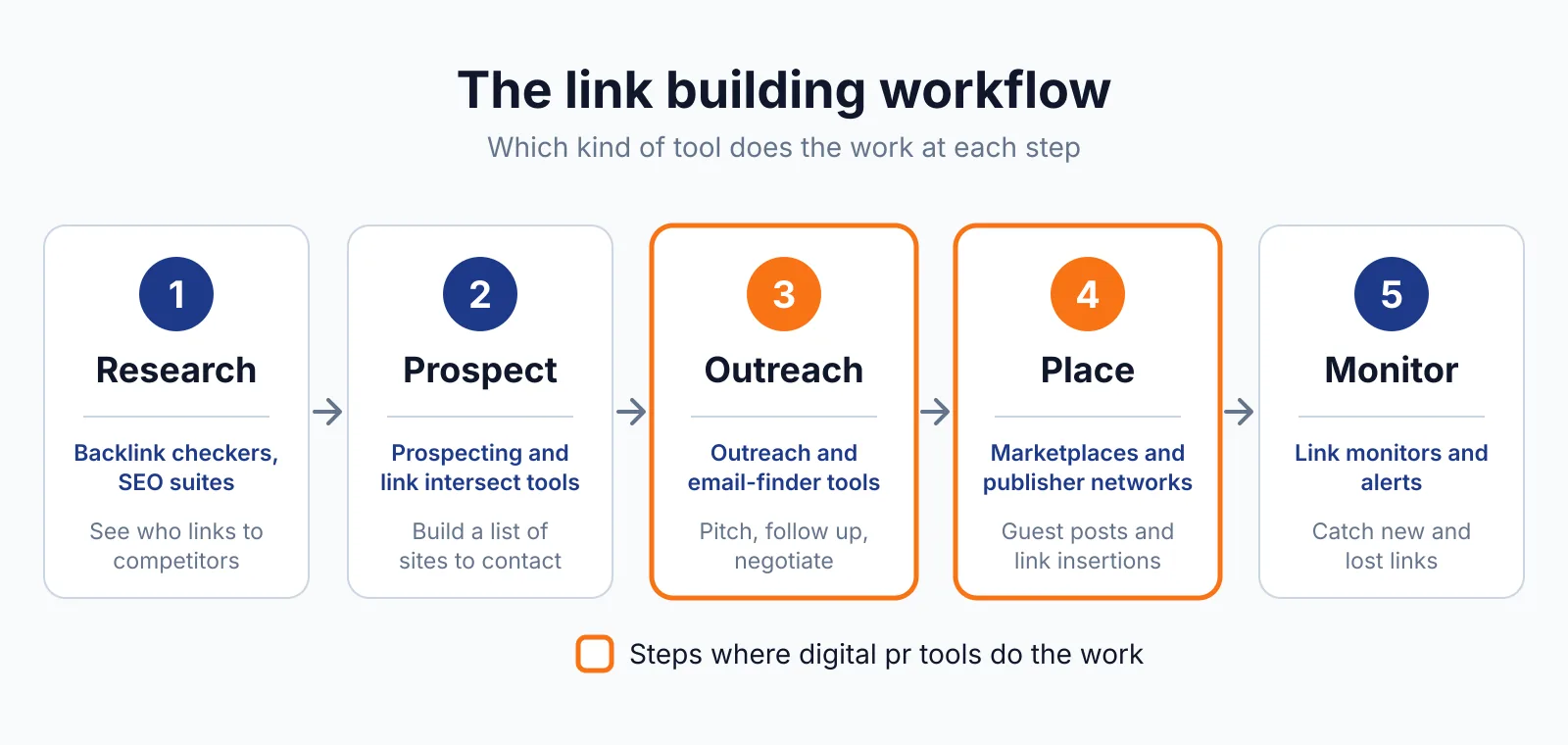
Featured.com does not cover prospecting site owners, guest post outreach, or buying links, and it does not place links itself. It earns links through press coverage, so it sits beside outreach tools rather than replacing them.
Pick Featured.com if
- You are a PR team, founder, or expert who can answer reporters and podcast hosts.
- You want journalist requests, podcasts, speaking slots, and awards in one place.
- You want to see HARO and Connectively requests the moment they post.
- You want to check how AI search describes your brand and pitch the gaps.
Not a fit if
- You need a set number of links per month on a schedule.
- You have no expert on staff who can speak to reporters or hosts.
- You want links from a specific list of sites, since editors choose the outlet.
- You want a pure link marketplace rather than earned media.
Alternatives
| Tool | Why people switch | Pricing |
|---|---|---|
| Qwoted | Journalist requests with a lower entry price and a simpler feed | Check current pricing on their site |
| HARO | Free daily emails of journalist requests, now run by Featured | Check current pricing on their site |
| Connectively | Journalist requests with a free tier, also run by Featured | Check current pricing on their site |
FAQ
Is Featured.com free?
Yes, there is a free plan with a small daily AI allowance, enough for about 2 to 3 media opportunities a week in the company's own example, and no credit card is required. Paid individual plans start at $29 a month billed annually for Lite.
What happened to HARO?
Featured, operated by Terkel, Inc., acquired HARO in April 2025 and revived it as a free daily email, and it now runs as a standalone product that also feeds the Featured platform. HARO reaches 150,000 registered sources and 75,000 journalists and bloggers. Our Qwoted overview covers a simpler journalist-request platform if you want to compare.
Does Featured.com guarantee backlinks?
No. A picked quote usually brings a name, title, and company credit, and often a link from the publication, but no link is guaranteed. The platform reports over 2 million pitches sent, but that figure describes activity, not links.
How is Featured different from Qwoted?
Featured is a wider PR platform with journalist requests, podcasts, speaking slots, awards, and GEO audits, while Qwoted is a simpler journalist-request marketplace with a feed and a pitch limit. Featured also owns HARO and Connectively, so it sees their requests first.
Next step
If you want earned links from press coverage, start on the free plan, set up one workflow for your strongest topic, and pitch three requests this week, then check the coverage with our free backlink checker and our price checker.
For managed digital PR or a quote on a wider campaign, see our pricing or our contact page, and browse our guest posting service if you also want placed links.

The BacklinkPrice Team researches backlink prices, publisher sites and link building tools. We check prices and plans against each provider's own pages and date them, so you know how current the numbers are.
More from BacklinkPrice TeamRelated guides