What Is Moz Local? Features, Pricing and How It Helps Link Building
Moz Local pushes your business name, address, and hours to 90+ directories and keeps them in sync. It costs $20 to $40 a month per location.
Moz Local is Moz's tool for managing a business's listings across the web. It pushes your name, address, phone, and hours to 90+ directories, keeps them in sync when details change, watches your reviews, and tracks local rankings with a Local Grid.
It is a separate purchase from Moz Pro, and it is built for local businesses in the United States, Canada, and the United Kingdom only.
TL;DR
- Moz Local costs $20 to $40 a month per location, with Lite at $20, Preferred at $30, and Elite at $40, or $199, $299, and $399 a year when billed annually.
- One subscription covers one physical location, with no volume discount, so 10 locations cost 10 times the single-location price.
- Every plan includes distribution to 90+ directories, review monitoring, Local Grid ranking, and Data Health analytics.
- There is no free plan and no free trial stated on the pricing page. You can manage a Google Business Profile directly for free without Moz.
Quick facts
| Fact | Detail |
|---|---|
| What it does | Syncs business listings to 90+ directories, monitors reviews, and tracks local rankings |
| Best for | Local businesses in the US, Canada, and UK with one or several locations |
| Starting price | $20 a month per location for Lite |
| Free option | No free plan or free trial; Google Business Profile itself is free to manage |
| Website | moz.com |
| Checked | November 2026 |
What Moz Local does for link building
Keep your business details the same everywhere
Moz Local sends your business name, address, phone, and hours to 90+ directories and keeps them consistent when something changes. A citation is any mention of your business name, address, and phone number on the web, with or without a link.
When the same details appear the same way in dozens of places, search engines trust that the business is real and located where it says it is.
That consistency matters because messy data costs rankings and customers. If your old address still sits on five directories after a move, some customers will drive to the wrong place, and Google will see conflicting signals about where you operate. One clean record removes that doubt.
For example, a vet clinic moves two streets over and updates its hours in Moz Local once. The change flows out to the directories in the network, so nobody has to log in to each one and fix the address by hand.
One limit to know: distribution depends on location. Not every directory in the 90+ count serves every town, and availability varies by country, so a small UK town will see fewer live listings than Chicago.
See how visible you are across the map
The Local Grid measures keyword visibility at points across a geographic area, so you can see how you rank a few blocks north of your shop as well as at your front door. A separate Google Rankings view reports organic and local-pack rankings for ten account keywords.
Local rankings are not the same everywhere. A bakery can top the Local Pack from its own street and sit tenth from the far side of town, and a single-point rank check hides the gap. A grid shows the weak spots, so you know where to focus citation and review work next.
For example, a locksmith tracks "emergency locksmith" across a grid of 25 points around his shop. The grid shows strong rankings near the shop and weak ones in the suburb to the west, so he asks customers there for reviews and checks his citations on directories that serve that area.
One limit to know: the grid only measures visibility. It does not tell you why a spot is weak, and it will not show competitor backlinks or citation gaps the way a dedicated citation finder does.
Watch reviews and answer them in one place
Every Moz Local plan includes review monitoring, and Preferred adds review responding, sentiment analysis, and competitor analysis. Elite adds a reporting suite on top. Reviews are a core local ranking signal and the first thing a customer reads in the Local Pack, so one dashboard beats checking Google, Facebook, and Yelp separately.
An unanswered bad review sits in public and shapes the next ten customers who read it. A fast, polite reply shows the business is active and cares, and it can turn a one-star story into a reason to trust the business instead.
Sentiment analysis helps an owner spot a pattern, such as three reviews in a row mentioning slow phone answers, before it becomes a reputation problem.
For example, a dental practice gets a two-star review about a long wait. The owner sees it the same day, replies with an apology and a direct phone number, and the patient updates it to four stars after a follow-up call.
One limit to know: review monitoring only covers the sites Moz Local watches. It is not a full review management platform, and responding still needs a person to write each reply.
Post to social without opening five apps
Preferred adds social posting to Google and Facebook, and Elite adds Instagram, LinkedIn, and TikTok, plus ad boosting and responding. The idea is simple: one dashboard for the posts that keep a local business visible between jobs, instead of a separate login for each network.
Local businesses win repeat trade by staying in front of past customers. A weekly post about a new service or a seasonal offer keeps the business in the feed, and it takes ten minutes from one dashboard instead of an hour across five apps.
For example, a garden centre posts its weekend plant sale to Google and Facebook from Moz Local on Friday morning, then boosts it on Saturday when foot traffic peaks.
One limit to know: social posting is a side feature, not the product. If social is your main channel, a dedicated social tool gives you more scheduling and reporting options.
Add AI help where the base plans stop
Two add-ons extend the plans. Listings AI costs $14 a month, or $119 a year, on Lite and Preferred, and it is included in Elite. Reviews AI costs $10 a month, or $69 a year. Both add AI-written help for listings and reviews on top of standard distribution and monitoring.
The add-ons change the value of each plan. Preferred plus Listings AI costs $418 a year, which is more than Elite at $399 a year, and Elite already includes Listings AI. A business that wants the AI features should compare the full yearly cost of Preferred with the add-on against Elite before it picks a plan.
For example, a three-location salon chain wants Listings AI for all three sites. On Preferred that means $299 plus $119 per location per year, or $1,254 a year. On Elite it means $399 per location per year, or $1,197 in total, plus wider social posting and reporting.
One limit to know: the add-ons do not change the per-location rule. Each location still needs its own subscription, and the add-on price applies per location too.
Moz Local pricing
Moz Local prices run from $20 to $40 a month per location, with annual billing cutting the monthly figure by about a fifth. All prices below are in US dollars, checked November 2026, from reads of Moz Local's pricing page.
The page itself could not be opened directly in this session, so the figures are the consistent numbers across several reads of that official page from September to November 2026. See our pricing page for what the same work costs when we do it for you.
| Plan | Monthly billing | Annual billing | What you get |
|---|---|---|---|
| Lite | $20 a month per location | $199 a year, shown as $16 a month | Directory management, Local Grid, review monitoring, Data Health analytics |
| Preferred | $30 a month per location | $299 a year, shown as $24 a month | Everything in Lite, plus review responding, sentiment analysis, competitor analysis, social posting to Google and Facebook, agency permissions |
| Elite | $40 a month per location | $399 a year, shown as $33 a month | Everything in Preferred, plus Instagram, LinkedIn, and TikTok posting, social ad boosting, social responding, reporting suite, Listings AI included |
The annual prices shown as monthly figures are rounded down by Moz. True monthly equivalents are $16.58 for Lite, $24.92 for Preferred, and $33.25 for Elite. Enterprise is custom for 50+ locations, with an account manager, extra directories, and flexible billing.
| Add-on | Price |
|---|---|
| Listings AI | $14 a month, or $119 a year, on Lite and Preferred; included in Elite |
| Reviews AI | $10 a month, or $69 a year |
A worked example: 10 locations on Preferred cost $300 a month, or $2,990 a year on annual billing. Five locations on annual Preferred cost $1,495 a year.
And a business that wants Listings AI should check the trap noted above: Preferred plus Listings AI at $418 a year per location costs more than Elite at $399 a year, which includes it.
There is no free plan and no free trial stated on the pricing page. Moz Pro is a separate purchase and is not included with Moz Local.
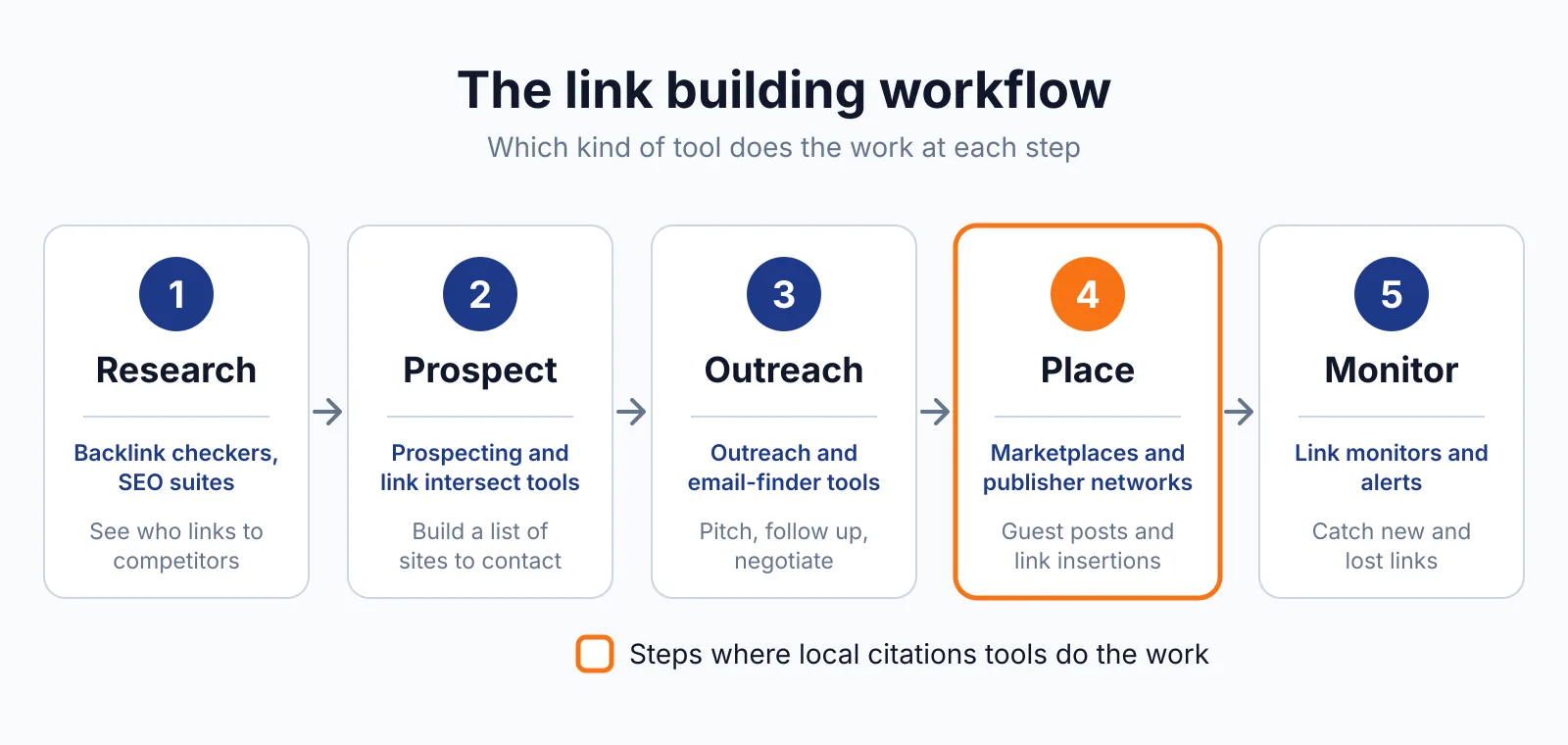
Where Moz Local fits in a link building workflow
- Claim and clean up the business's Google Business Profile, which is free to manage directly.
- Buy one subscription per location and push the correct details to the directory network.
- Check Data Health analytics for conflicting or missing details and fix them at the source.
- Watch the Local Grid each week to see which areas are weak, then focus citation and review work there.
- Answer reviews from the dashboard and post weekly updates to Google and Facebook to keep the profile active.
Moz Local does not cover outreach, guest posting, or backlink building. It buys, places, or guarantees no links. Citations are business listings, not link placements, and a genuine citation needs no sponsored or nofollow label.
If you ever pay for a link to improve rankings, Google requires it to carry rel="sponsored" or rel="nofollow". For outreach, use our link building outreach service alongside it.
Pick Moz Local if
- You run a local business in the US, Canada, or UK and want listings, reviews, and rank tracking in one place
- You have a few locations and want a simple per-location price
- You want review responding and social posting without buying a second tool
- You use Moz Pro and want the listings side from the same vendor
Not a fit if
- You manage 50 locations and need a volume discount, since the rate does not fall with volume
- You need a backlink database or competitor link analysis
- You operate outside the US, Canada, and UK
- You want a free plan or a trial before you pay
Alternatives
| Tool | Why people switch | Pricing |
|---|---|---|
| Whitespark | Buy each local SEO tool separately at a lower per-location cost | Check current pricing on their site |
| BrightLocal | A single platform for listings, reviews, and rank tracking | Check current pricing on their site |
| Yext | Enterprise listings sync across 200+ publishers | Check current pricing on their site |
| Birdeye | Reviews, listings, and messaging in one platform | Check current pricing on their site |
FAQ
Is Moz Local the same as Moz Pro?
No. Moz Local is a separate purchase for managing business listings, reviews, and local rankings, while Moz Pro is Moz's SEO suite for keyword research, rank tracking, and backlink analysis. Buying one does not include the other.
Why does Moz Local cost more for more locations?
Each location needs its own subscription, and the rate does not fall with volume. Ten locations on Preferred cost $300 a month, ten times the single-location price. Enterprise pricing for 50+ locations is custom, with an account manager and flexible billing, so large chains should talk to sales.
Does Moz Local include a free trial?
No free plan and no free trial are stated on the pricing page. You can manage a Google Business Profile directly for free without Moz. Moz Local itself is paid-only, so the first bill starts as soon as you subscribe.
Can Moz Local build backlinks?
No. It distributes business listings and monitors reviews, and it buys, places, or guarantees no links. A citation can include a link back to your site, but that link is a by-product of a correct listing, not a placement you bought. For earned links, see our guest posting service.
Next step
If your listings are inconsistent across directories, start with one location on Lite and check Data Health after the first sync. If you want help turning clean listings into local links and rankings, see our local link building services or contact us.

The BacklinkPrice Team researches backlink prices, publisher sites and link building tools. We check prices and plans against each provider's own pages and date them, so you know how current the numbers are.
More from BacklinkPrice TeamRelated guides