What Is Moz Pro? Features, Pricing and How It Helps Link Building
Moz Pro is a focused SEO suite built around Link Explorer, Domain Authority and Spam Score, with plans from $49 a month checked November 2026.
Moz Pro is an SEO suite built around link data, with Link Explorer, Domain Authority and Spam Score at its centre. It is smaller in scope than some all-in-one suites, and that focus makes it easier to learn for a team that mainly needs link checks.
It fits freelancers, small agencies and in-house teams who want clear link scores without a large set of extra tools.
TL;DR
- Moz Pro starts at $49 a month for the Starter plan, with annual billing at $79 a month for Standard, $143 a month for Medium and $239 a month for Large.
- Link Explorer shows backlinks, linking domains and anchor text, with Domain Authority and Page Authority scored from 1 to 100.
- Link Intersect finds sites that link to competitors and not to you, so you can build a prospect list from warm sites.
- There is no permanent free Pro tier, and you get a 7-day free trial plus a free community account with 10 queries a month.
Quick facts
| Fact | Detail |
|---|---|
| What it does | SEO suite for link research, rank tracking, site audits and keyword research |
| Best for | Freelancers, small agencies and in-house teams who want clear link scores |
| Starting price | $49 a month, checked November 2026 |
| Free option | 7-day free trial, plus a free community account with 10 queries a month |
| Website | moz.com |
| Checked | November 2026 |
What Moz Pro does for link building
Find sites that link to your competitors
Link Intersect compares your domain with competitor domains and lists sites that link to them. A referring domain is one website that links to you, even if it links from several pages. Those sites already link to similar content, so they are warmer prospects than sites with no link history in your niche.
For example, a local SaaS tool can run Link Intersect against three rivals and find blogs, directories and resource pages that link to at least two of them. The team can then check each site for relevance and start outreach with the ones that link to more than one rival.
That list is short, and it is often stronger than a long list built from a keyword search alone.
The intersect list can include old links from pages that no longer cover the topic. You need to open each prospect and check that the page is still live and still relevant before you send a pitch.
Check the quality of a linking site
Link Explorer shows backlinks, linking domains, anchor text and spam signals for any domain you check. Domain Authority is Moz score from 1 to 100 for how likely a domain is to rank, and Page Authority is the same kind of score for a single page. You can use those scores to sort prospects before you spend time on outreach.
For example, a link builder can compare two blogs in the same niche and pick the one with higher Domain Authority and more linking domains. The check takes a few minutes and it can stop a week of outreach to a site that adds little value.
Anchor text also shows whether a site tends to link with brand names, plain URLs or exact match phrases.
Domain Authority is a Moz rating and Google does not use it as a ranking factor. You still need to read the linking page and check its relevance before you ask for a link.
Spot low-quality sites before you pitch them
Spam Score is Moz rating that flags sites with traits often seen in low-quality sites. Link Explorer pairs that score with link counts and anchor data, so you can see a weak profile before you add a site to a prospect list.
That early check saves time, because you can drop a risky site in minutes instead of learning about it after a link goes live.
For example, a team can check a prospect with a high link count and a high Spam Score, then look at its recent posts and outbound links. If the posts read like filler and the site links to many unrelated pages, the team can skip it and move to the next prospect.
That judgement takes longer than a score alone, and it is worth the extra minutes.
A Spam Score is a warning, and it does not prove Google sees the site the same way. You should review the site by hand and read the Google spam policies before you treat a score as a final verdict.
Track links you gain and links you lose
Moz Pro tracks your link profile over time, so you can see new links, lost links and changes in Domain Authority. That view helps you spot a lost link soon after it drops, and a lost link is often easier to win back than a new link.
You can also watch whether a campaign adds links from new domains or only from sites that already link to you.
For example, an agency can check a client each month and find four links lost after a site redesign. The team can then email those site owners with the new URL and ask them to fix the link.
Link counts can lag behind the live web, so a link marked as lost may still be live on a cached page. You should open the page before you email the site owner about a missing link.
Check a site while you browse it
MozBar is a browser add-on that shows Domain Authority, Page Authority and link data while you visit a site. That lets you judge a prospect in the moment, without copying its URL into a separate report. It is useful when you are reading a blog list or a resource page and you want a quick sense of each site.
For example, a link builder can open a roundup post, check the MozBar scores for each linked site and note the three strongest ones for outreach. The add-on does not replace a full Link Explorer report, and it does give you a fast first filter.
You can then run the short list through Link Explorer for anchor text and Spam Score.
MozBar shows scores for the page you are on, and it does not show the full backlink list for that domain. You still need Link Explorer when you want the full list of links and anchors.
Moz Pro pricing
Moz Pro pricing starts at $49 a month for the Starter plan and rises to $299 a month for Large on monthly billing, with Enterprise priced as a custom plan. Annual billing cuts the monthly rate by 20 percent, so Standard drops from $99 to $79 a month and Medium drops from $179 to $143 a month.
Prices were checked November 2026 on the Moz Pro pricing page.
| Plan | Monthly price | Annual price |
|---|---|---|
| Starter | $49 a month | $49 a month |
| Standard | $99 a month | $79 a month |
| Medium | $179 a month | $143 a month |
| Large | $299 a month | $239 a month |
| Enterprise | Custom | Custom |
If you take the Medium plan on annual billing, you pay $143 a month, which works out to $1,716 a year for 10 sites, 1,500 keywords and 20,000 backlink queries a month. That is $36 a month less than monthly billing, so a team that uses the tool each week saves $432 a year by paying up front.
Compare the result with our backlink pricing database and our price checker before you set a budget for outreach, and extra seats cost $49 a month each.
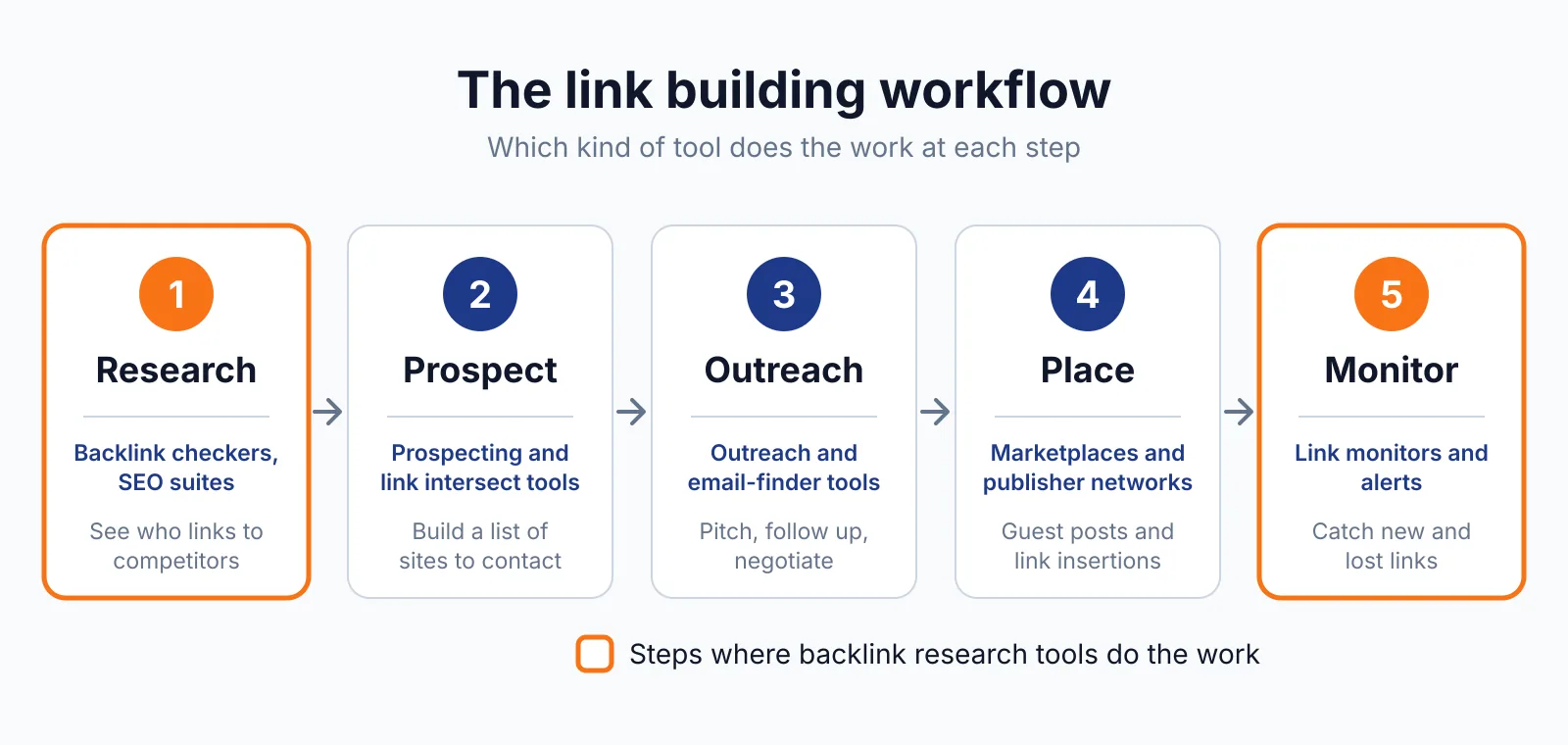
Where Moz Pro fits in a link building workflow
- List your main competitors and run Link Intersect to find sites that link to them.
- Check each prospect in Link Explorer for Domain Authority, Page Authority, Spam Score and anchor text.
- Drop low-quality sites and keep the prospects with relevant pages and clean link profiles.
- Pitch the best sites with a guest post or a link insertion, which is a link added to an existing page rather than a new post.
- Track new and lost links each month and follow up on lost links first.
Moz Pro does not send outreach emails or write your content for you. You still need a writer, an editor and a person who replies to site owners.
Pick Moz Pro if
- You want clear link scores and a simple link report.
- You manage a small set of sites and want a lower starting price.
- You check links often and want a monthly plan with a trial.
- You like to check a site in the browser with MozBar.
Not a fit if
- You need a large prospect list with built-in outreach tracking.
- Your team needs many seats on one plan without extra seat fees.
- You want a free tier for ongoing link work.
- You need a tool that only covers one country or one language.
Alternatives
If Moz Pro feels too narrow, compare it with Semrush on the Semrush pricing page and Majestic on the Majestic pricing page. Semrush adds more tools in one login, while Majestic focuses on link-only data.
| Tool | Why people switch | Pricing |
|---|---|---|
| Semrush | Wider tool set with outreach tracking | Check current pricing on their site |
| Majestic | Link-only data with Trust Flow and Citation Flow | Check current pricing on their site |
| Ahrefs | Large backlink index and a familiar workflow | Check current pricing on their site |
FAQ
Does Moz Pro have a free plan?
Moz Pro has no permanent free Pro tier, and you get a 7-day free trial to test the paid plans. A free community account gives you 10 queries a month, which is enough for a quick check and too little for regular link work.
How many backlink queries do I get on the Starter plan?
The Starter plan gives you 75 backlink queries a month, with 1 site and 50 keywords. Standard gives you 5,000 backlink queries a month, Medium gives you 20,000 and Large gives you 70,000.
What is the difference between Domain Authority and Page Authority?
Domain Authority is a 1 to 100 score for a whole domain, while Page Authority is a 1 to 100 score for a single page. You can use Domain Authority to compare sites, and Page Authority to compare two pages on the same topic.
Can I add more seats to a Moz Pro plan?
Yes, extra seats cost $49 a month each. You can add seats when your team grows, and you should check the price for your plan before you add several seats at once.
Next step
Start with our free SEO tools to check a backlink profile or a price before you commit to a paid plan. If you want help with outreach, tell us about your site on our contact page and we will reply with next steps.

The BacklinkPrice Team researches backlink prices, publisher sites and link building tools. We check prices and plans against each provider's own pages and date them, so you know how current the numbers are.
More from BacklinkPrice TeamRelated guides