What Is Skrapp.io? Features, Pricing and How It Helps Link Building
Skrapp.io finds verified business emails from LinkedIn, Sales Navigator and company websites, so you can reach editors without guessing at addresses.
Skrapp.io is an email finder and verifier built around LinkedIn and company websites. It finds verified business emails from LinkedIn profiles, Sales Navigator, Recruiter, and company sites, then checks each address in real time.
A referring domain is one website that links to you, even if it links from several pages, and Skrapp.io helps you contact the people behind those domains. It is for link builders and sales teams who prospect mainly on LinkedIn and need a direct address for each person.
TL;DR
- Skrapp.io starts at $39 per month billed monthly on Professional, or $29 per month billed annually.
- The free plan includes 50 credits as a one-time allotment, not a monthly refill.
- Every returned email is verified in real time, with a site claim of 97 percent verification accuracy.
- Unused credits roll over to the next month, and credits are kept even if you cancel.
Quick facts
| Fact | Detail |
|---|---|
| What it does | Finds verified business emails from LinkedIn and company websites |
| Best for | Link builders who prospect on LinkedIn and Sales Navigator |
| Starting price | $39 per month, or $29 per month billed annually |
| Free option | Free plan with 50 credits, one-time allotment |
| Website | skrapp.io |
| Checked | November 2026 |
What Skrapp.io does for link building
Find emails on LinkedIn with one click
Skrapp.io has a Chrome extension that finds emails on LinkedIn and Sales Navigator with one click. The extension lets you save a prospect while you browse, instead of copying names into a spreadsheet and searching again later. Email Finder also works from company websites, so you can find an address for a person you found in a backlink report.
For example, you can open a resource page, find the editor on LinkedIn, and use the extension to get a verified email in the same session. You then send a pitch that names the page and the gap you can fill.
Verify every email in real time
Email Verifier checks every returned email in real time, and the site claims 97 percent verification accuracy and a 92 percent average search success rate. The database is refreshed daily, which helps when people change roles or domains.
Skrapp.io also has a Fair Credit Policy: it charges no credit for emails labelled Invalid or Unknown, so you do not pay for a result you cannot use.
For example, you can run a list of 200 LinkedIn prospects through Skrapp.io, and only the Valid or Catch-all results use a credit. The Invalid and Unknown results cost nothing, and you can skip them.
The limit is the Catch-all result: a Catch-all address may accept mail, and you still need to check the reply rate before you trust it at scale.
Enrich a prospect with company and role data
Enrichment adds company firmographics such as industry, size, location, and revenue, plus profile data such as job title, seniority, and department. The database covers 200 million plus B2B contacts and 40 million plus company profiles, as stated on the site.
Multi-Page Enrichment for LinkedIn is included on Professional and above, and List Saver for Sales Navigator is also Professional and above.
For example, you can enrich a list of SaaS companies and keep only those with 50 to 500 staff, then filter by content or partnerships roles. The result is a short list that fits your SaaS link building offer.
Export lists and sync them to a CRM
List Exports let you download a prospect list, and List CRM Sync connects to HubSpot, Salesforce, and Pipedrive on Professional and above. AI Enrichment is also Professional and above, and API and SSO are Enterprise only.
For example, you can save a Sales Navigator list in Skrapp.io, export it to HubSpot, and let the outreach team work from the CRM.
Skrapp.io pricing
Skrapp.io pricing runs from $0 to $349 per month on monthly billing, with custom plans via sales, checked November 2026. Free is $0, with 50 credits as a one-time allotment, not a monthly refill, and 1 user.
Professional is $39 per month billed monthly, or $29 per month billed annually, with 2,000 credits per month and 2 users, and it is marked as most popular. Enterprise is $349 per month billed monthly, or $262 per month billed annually, with 50,000 credits per month and 15 users. Yearly billing saves 25 percent.
No credit card is required for the 50 free credits. No separate paid-plan trial is stated.
| Plan | Price per month, monthly | Price per month, billed yearly | Credits per month | Users |
|---|---|---|---|---|
| Free | $0 | $0 | 50, one-time | 1 |
| Professional | $39 | $29 | 2,000 | 2 |
| Enterprise | $349 | $262 | 50,000 | 15 |
A Professional plan at $29 per month billed annually gives 2,000 credits per month. One credit equals 1 professional email found, Valid or Catch-all, or 1 email verified.
Where Skrapp.io fits in a link building workflow
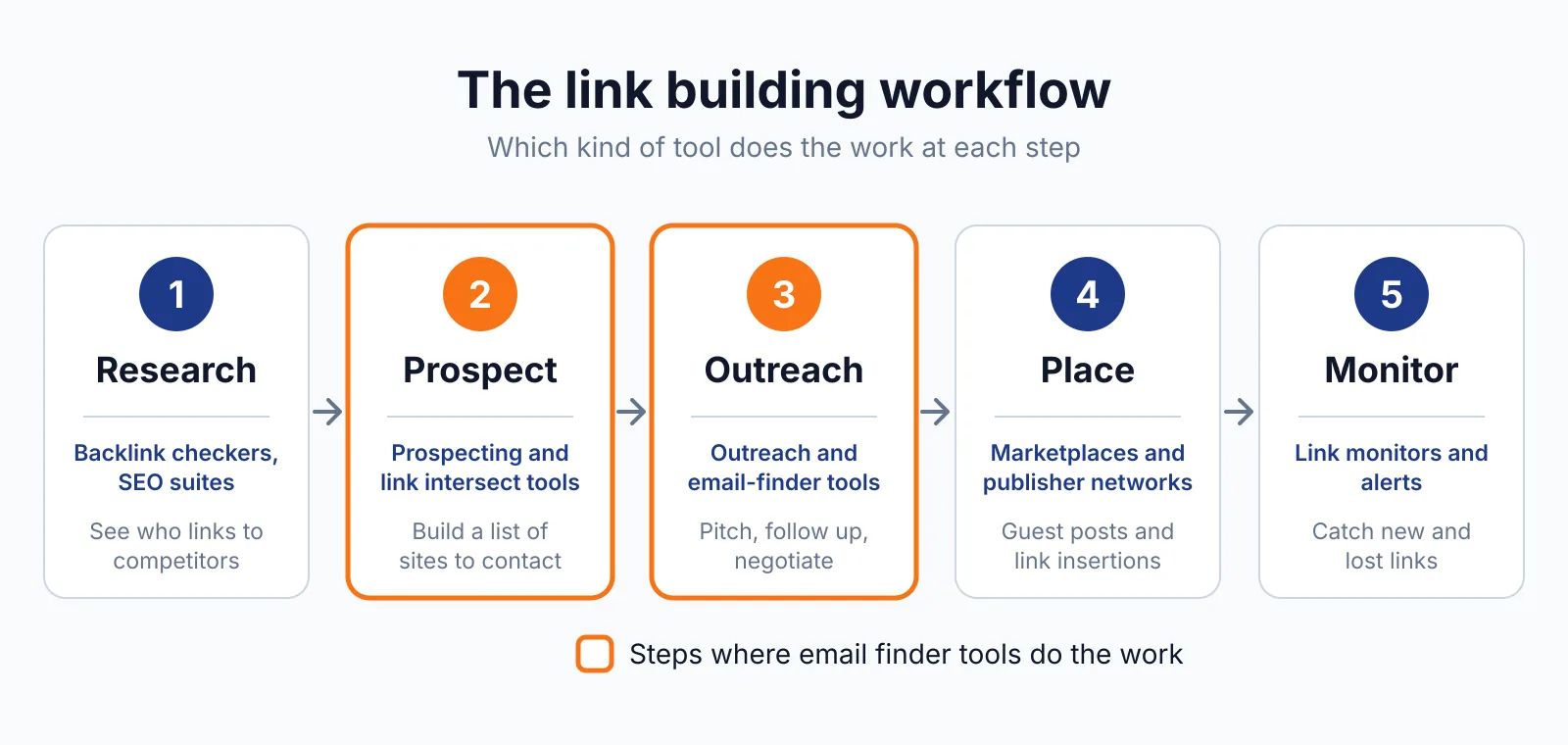
- Build a prospect list from competitor backlinks, then find the editor for each site on LinkedIn.
- Use the Skrapp.io extension to find a verified email for each person, and save the list.
- Enrich the list with company size and role, and remove any contacts that do not fit.
- Export the list to your CRM or a spreadsheet, then send a short pitch with our email generator.
- Log replies and live links, then use our niche finder to find more sites in the same niche.
Skrapp.io does not cover backlink analysis, content writing, or sending outreach, so you still need a backlink checker to build the first list and an outreach tool to send the pitch.
Pick Skrapp.io if
- You prospect mainly on LinkedIn and Sales Navigator
- You want real-time verification with no charge for Invalid or Unknown results
- You want unused credits to roll over to the next month
- Your team shares one credit pool and wants a simple plan
Not a fit if
- You need backlink data, because Skrapp.io does not analyse links
- You need to send outreach, because Skrapp.io does not send emails
- You need API or SSO, because those are Enterprise only
- You prospect mainly by domain, because a domain finder may suit you better
Alternatives
| Tool | Why people switch | Pricing |
|---|---|---|
| Hunter.io | To find emails by domain and send sequences in one place | Check current pricing on the Hunter.io site |
| Snov.io | To add email warm-up and multichannel campaigns | Check current pricing on the Snov.io site |
| Apollo.io | To use a larger contact database with a dialer | Check current pricing on the Apollo.io site |
| Lusha | To enrich contacts from LinkedIn profiles | Check current pricing on their site |
FAQ
How does Skrapp.io count credits?
Skrapp.io counts 1 credit for 1 professional email found, Valid or Catch-all, or 1 email verified. It charges no credit for emails labelled Invalid or Unknown under its Fair Credit Policy. That rule helps you test a list without paying for dead results.
Do Skrapp.io credits expire?
Unused credits roll over to the next month, and credits are kept even if you cancel.
Can I use Skrapp.io without LinkedIn?
Yes, Skrapp.io also finds emails from company websites, and Email Finder works from a name and domain as well as from LinkedIn. The Chrome extension is the fastest route on LinkedIn, and Bulk Email Finder lets you upload a CSV or Excel file of names and domains. Use our free backlink checker first to build that domain list.
Google lists buying links for ranking purposes as link spam in its spam policies, so keep each pitch relevant to the site you contact.
Next step
Start with the 50 free credits and test Skrapp.io on a small LinkedIn list, then check the backlink pricing database to see what a link on those sites is worth. Compare it with Hunter.io and Snov.io before you choose. If you want us to run the outreach, see our link building outreach service or contact us.

The BacklinkPrice Team researches backlink prices, publisher sites and link building tools. We check prices and plans against each provider's own pages and date them, so you know how current the numbers are.
More from BacklinkPrice TeamRelated guides