What Is a Hub Page? Definition, Examples, and How to Build One
A hub page is a central page that organises and links to your content on one topic. Here is how it differs from pillar and category pages, and how to build one.
A hub page is a central page that organises and links to all of a site's important content on one topic, acting as a directory that helps readers find the right page and helps search engines understand how those pages relate.
Unlike a long pillar guide, a hub page is mainly navigation: short introductions to each sub-area, with clear links to the detailed pages.
Key takeaways
- A hub page is a topic directory: brief context plus organised links to related pages.
- It differs from a pillar page, which covers a topic in depth, and a category page, which is often an automatic list.
- Google says every page you care about should be linked from at least one other page, and hubs help make that true.
- Hubs reduce orphan pages and spread link value from the hub to the pages it links to.
- A well-organised hub can become a link target in its own right, because it is a useful starting point.
Hub page definition
A hub is the "home page" for one topic on your site.
It answers the question, "Where do I start with this topic?" Each section of the hub introduces a sub-area and links to the best pages on it.
Hub pages are also called content hubs or resource hubs. They sit between your home page and your individual articles in the site structure.
Hub page vs pillar page vs category page
These terms overlap, but they are not the same.
| Page type | Main job | Content depth | How it's built |
|---|---|---|---|
| Hub page | Organise and link to related content | Light: short intros plus links | Curated by an editor |
| Pillar page | Cover a broad topic in depth | Deep: a full guide | Written as a long article |
| Category page | List posts in a category | Very light: often auto-generated | Created by the CMS |
HubSpot's description of topic clusters uses a pillar page as the centre of a cluster. A hub can play the same central role, but it puts navigation ahead of long-form content.
For the cluster model, see what is topical authority.
Why hub pages help SEO
Hubs make your site easier to crawl and understand.
Google's link best practices say every page you care about should have a link from at least one other page on your site. A hub links to every important page in its topic.
Google also explains, in its guidance on site structure, that it analyses relationships between pages based on how they link. A hub makes those relationships clear.
When the hub earns links, internal links pass some of that value onward. Read what is link equity.
Why hub pages help link building
A useful hub is a natural resource to cite.
Writers and educators like linking to a single, well-organised starting point. A hub on a topic can earn links from resource pages, courses, and forum answers.
Most pages earn no links. An Ahrefs study of about 1 billion pages found 66.31% had no backlinks at all. Hubs help pages that will never earn links on their own still get internal links and visibility.
How hub pages fit into site structure
Think of three levels: home page, hubs, and detail pages.
The home page links to a handful of hubs. Each hub links to the detail pages in its topic. Detail pages link to each other where it helps, and back to their hub.
HubSpot's knowledge base describes a similar idea, where subtopic pages link back to the central page for their topic. This keeps important pages within a few clicks of the home page.
Hub page examples
Here are common hub formats.
- Learning hub: "SEO for beginners", with sections for keywords, on-page SEO, links, and technical SEO.
- Product resource hub: guides, tutorials, and FAQs for one product.
- Industry hub: all content for one audience, such as "link building for SaaS".
- Glossary hub: definitions grouped by topic, each linking to a full explainer.
- Data hub: all your studies and statistics pages in one place.
Step-by-step: how to build a hub page
Plan the structure before writing.
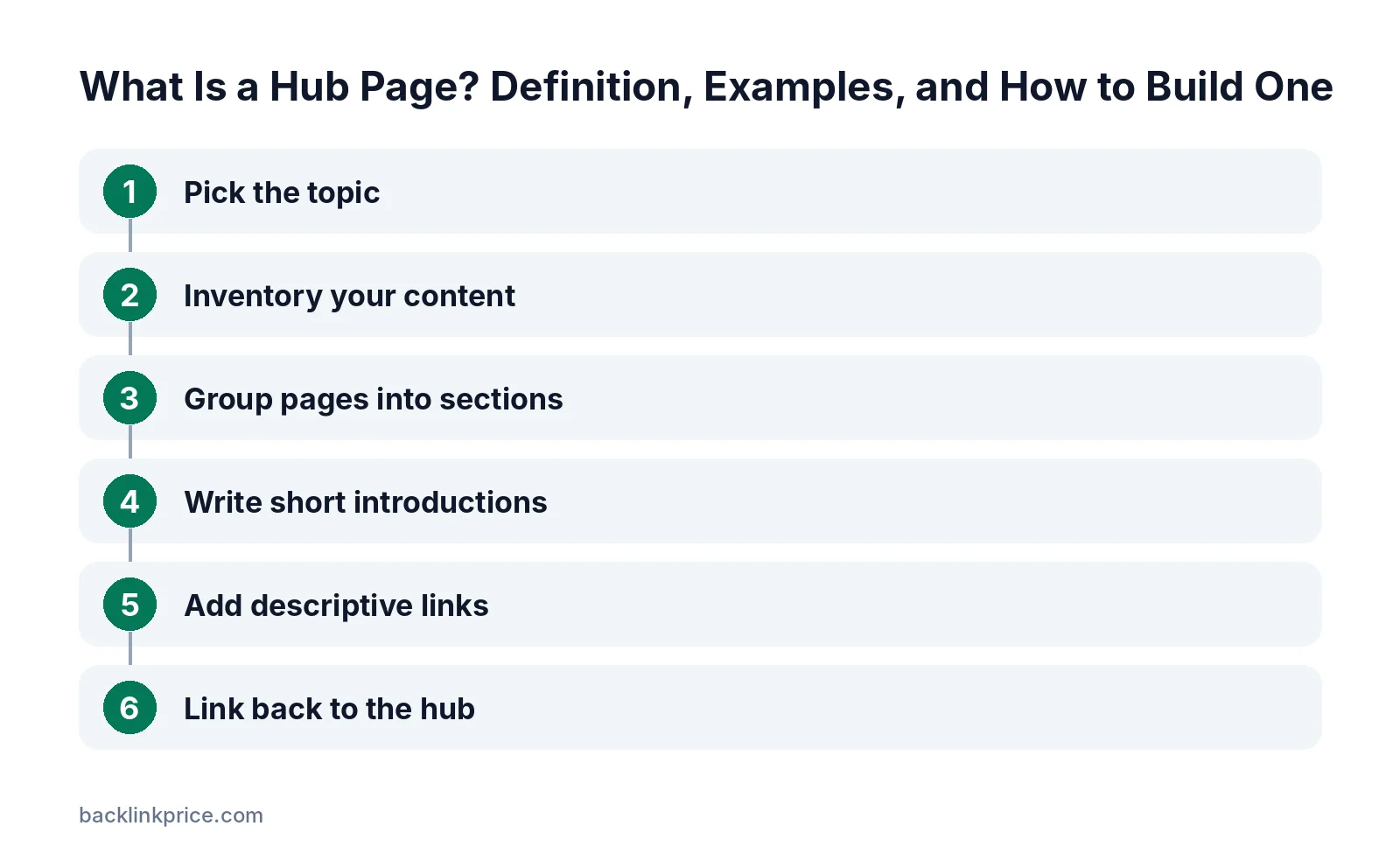
Step 1: Pick the topic
Choose a topic where you already have, or plan to have, many pages. A hub with three links adds little.
Step 2: Inventory your content
List every page on the topic. Merge duplicates, update thin pages, and note gaps to fill later.
Step 3: Group pages into sections
Group pages by sub-topic or by reader journey, such as beginner, intermediate, and advanced. Give each section a clear heading.
Step 4: Write short introductions
Add one or two sentences per section explaining what the reader will learn. Keep the hub skimmable.
Step 5: Add descriptive links
Use anchor text that describes each destination page, not "click here". See does internal anchor text matter.
Step 6: Link back to the hub
Add a link from each page in the hub back to the hub, for example in an intro or breadcrumb. Read how to build internal links.
Hub page mistakes
Avoid these common problems.
- Listing every post with no organisation, like a duplicate category page.
- Forgetting to update the hub when new content is published.
- Linking to outdated or thin pages.
- Creating several hubs that cover the same topic.
- Hiding the hub where users and crawlers cannot find it.
Hub pages and AI answers
Clear structure helps AI tools find the right page.
A hub signals which pages cover which sub-topics. Pair it with pages that answer one question clearly near the top.
Read how to structure articles for AI answers for formatting tips. Most content earns no external links, as the Backlinko and BuzzSumo content study found 94% of posts had none, so internal structure matters even more.
Frequently Asked Questions
What is the difference between a hub page and a pillar page?
A hub page mainly organises and links to related content with short introductions. A pillar page covers a broad topic in depth as a full guide. Some sites combine both roles in one page.
Is a hub page the same as a category page?
Not quite. Category pages are usually auto-generated lists of posts. A hub page is curated, with sections, introductions, and the most useful links chosen by an editor.
How many links should a hub page have?
Enough to cover the topic's important pages, organised into clear sections. Avoid listing every minor post. Quality and structure matter more than the number of links.
Do hub pages help rankings?
They can. Hubs improve internal linking, help search engines understand related pages, and pass link value to the pages they link to. They also help readers find the right content.
Where should a hub page sit in the navigation?
Link to it from the main menu or a top-level section, and from every page it covers. The hub should be easy to reach in one or two clicks from the home page.
Sources

The BacklinkPrice Team researches backlink prices, publisher sites and link building tools. We check prices and plans against each provider's own pages and date them, so you know how current the numbers are.
More from BacklinkPrice TeamRelated guides