What Is a Topic Cluster? Definition, Example, and How to Build One
A topic cluster is a pillar page linked to focused cluster pages on related subtopics. Here is how it works and how to build one.
A topic cluster is a group of pages built around one broad pillar page, with several focused cluster pages that each cover a subtopic and link back to the pillar. The pillar links out to every cluster page, so the whole set forms a connected hub that shows search engines and readers you cover the topic in depth.
Key takeaways
- A cluster has three parts: a pillar page, cluster pages, and the internal links between them.
- HubSpot popularised the model and describes it as the "hub and spoke" approach to content.
- Google uses links to discover pages and understand site structure, which is why cluster linking matters.
- Clusters remove orphan pages by design, because every page links to and from the pillar.
- A strong pillar is also a natural link target, since other sites like to cite a complete resource.
Topic cluster definition
A topic cluster organises related content around one central page.
HubSpot describes topic clusters as a broad pillar page connected to cluster pages on related subtopics, with internal links from each cluster page back to its pillar. The model is also called "content clusters" or the "hub and spoke" model.
The idea is simple. Instead of a loose archive of posts, each topic gets a clear centre and a set of supporting pages.
The three parts of a topic cluster
Every cluster needs the same three building blocks.
| Part | What it is | Example for "link building" |
|---|---|---|
| Pillar page | A broad, in-depth guide to the main topic | "Link building: the complete guide" |
| Cluster pages | Focused pages on one subtopic or question each | Anchor text, outreach emails, guest posts |
| Internal links | Links from cluster pages to the pillar and back | Descriptive anchors in body copy |
HubSpot's knowledge base says a pillar page covers a topic in depth and links to supporting content, while each subtopic page should link back to the pillar.
How topic clusters help SEO
Clusters make your structure clear to both crawlers and readers.
Google's link best practices say every page you care about should have a link from at least one other page on your site. A cluster guarantees that by design.
Google also explains, in its guidance on ecommerce site structure, that it analyses the relationship between pages based on how they link. Menus and cross-page links shape how it understands a site.
Clusters also support topical authority. Learn more in what is topical authority.
How topic clusters help link building
A strong pillar page attracts links, and clusters spread that value.
In-depth guides earn more links than short posts. The Backlinko and BuzzSumo content study found posts over 3,000 words earned 77.2% more referring domains than shorter posts.
When a pillar earns backlinks, internal links pass some of that value to cluster pages. That is how link equity moves through a site.
Most pages earn nothing on their own. An Ahrefs study of about 1 billion pages found 66.31% had no backlinks at all, so linking pages together matters.
Topic cluster example
Here is a simple cluster for an ecommerce pet store.
- Pillar: "Dog nutrition: a complete guide".
- Cluster: "How much water does a dog need?", "Best dog food for puppies", "Can dogs eat fruit?".
- Links: Each cluster page links to the pillar with a descriptive anchor, and the pillar links to each cluster page in the relevant section.
The pillar answers the broad question. Each cluster page answers one specific question in more depth.
How to build a topic cluster
Follow these steps to plan and link a cluster.
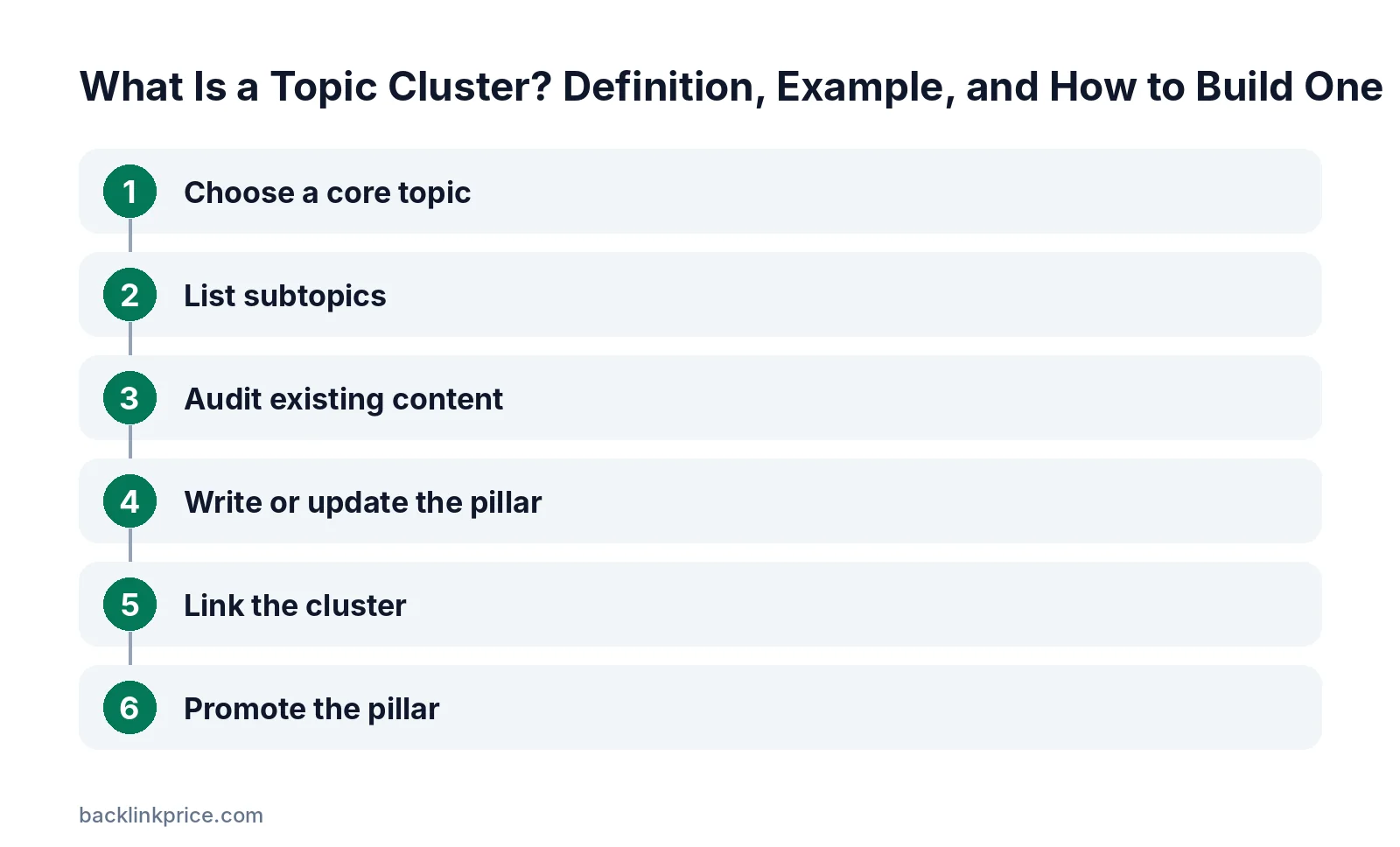
Step 1: Choose a core topic
Pick a broad topic tied to your business that has many related questions. It should be wide enough for a guide but narrow enough to cover well.
Step 2: List subtopics
Use keyword tools, "People also ask" boxes, and customer questions to find specific subtopics. Group them by search intent.
Step 3: Audit existing content
Map current pages to subtopics. Merge duplicates, update thin pages, and note gaps you need to fill.
Step 4: Write or update the pillar
Cover every key subtopic briefly, then link to the cluster page that covers it in depth. Answer the main question near the top.
Step 5: Link the cluster
Link each cluster page to the pillar, and the pillar to each cluster page. Add links between cluster pages where they help readers. See how to build internal links.
Step 6: Promote the pillar
Pitch the pillar as a resource to sites that link to similar guides. Most external links should point to the pillar or to cluster pages with original data.
How to measure a topic cluster
Track the cluster as one unit, not page by page.
- Total organic traffic and keywords across the pillar and cluster pages.
- Referring domains to the pillar and to cluster pages with data.
- Internal links pointing to each page, checked in a site audit.
- Rankings for the core topic and for each subtopic query.
Review the cluster every few months. Add pages for new questions and refresh pages that lose rankings.
Topic cluster mistakes to avoid
These mistakes weaken a cluster.
- Creating cluster pages that target the same keyword as the pillar.
- Linking with vague anchors like "click here" instead of descriptive text.
- Leaving cluster pages without a link back to the pillar.
- Building many thin pages instead of fewer, useful ones.
- Forgetting to update the pillar when you add new cluster pages.
For anchor guidance, read does internal anchor text matter.
Topic clusters and AI answers
Clusters make it easier for AI tools to find clear answers.
Each cluster page answers one question directly, which suits AI assistants that quote concise answers. Learn more in how to structure articles for AI answers.
Frequently Asked Questions
What is the difference between a pillar page and a topic cluster?
A pillar page is one page that covers a broad topic. A topic cluster is the whole group: the pillar, the cluster pages on subtopics, and the internal links that connect them.
How many pages should a topic cluster have?
There is no fixed number. Many clusters start with a pillar and five to ten cluster pages, then grow as you find new questions. Cover the subtopics your audience searches for, without creating thin pages.
Are topic clusters the same as content silos?
They are similar, since both group related content. Silos often use strict hierarchies and URL folders, while topic clusters focus on internal links between a pillar and its subtopic pages. Google says it generally does not use URL structure to work out site structure.
Do topic clusters still work in 2026?
Yes. Search engines and AI tools still rely on links and clear content structure to understand pages. A well-linked cluster helps crawlers find pages and helps readers move between related answers.
Should cluster pages link to each other?
They can, when it helps readers. HubSpot notes cluster pages link back to the pillar and often to each other. Add links between cluster pages only where the topics are closely related.
Sources

The BacklinkPrice Team researches backlink prices, publisher sites and link building tools. We check prices and plans against each provider's own pages and date them, so you know how current the numbers are.
More from BacklinkPrice TeamRelated guides