Open Multiple URLs: What It Does, Pricing and Alternatives
Open Multiple URLs is a free Chrome extension that opens a pasted list of web pages, each in its own tab. Here is how it works and which version to install.
Open Multiple URLs is a free Chrome extension that opens a pasted list of web pages, each in its own tab. You paste one address per line and click Open URLs. The version this article covers is the long-standing open-source one by developer tp, also known as htrinter, with its source code on GitHub.
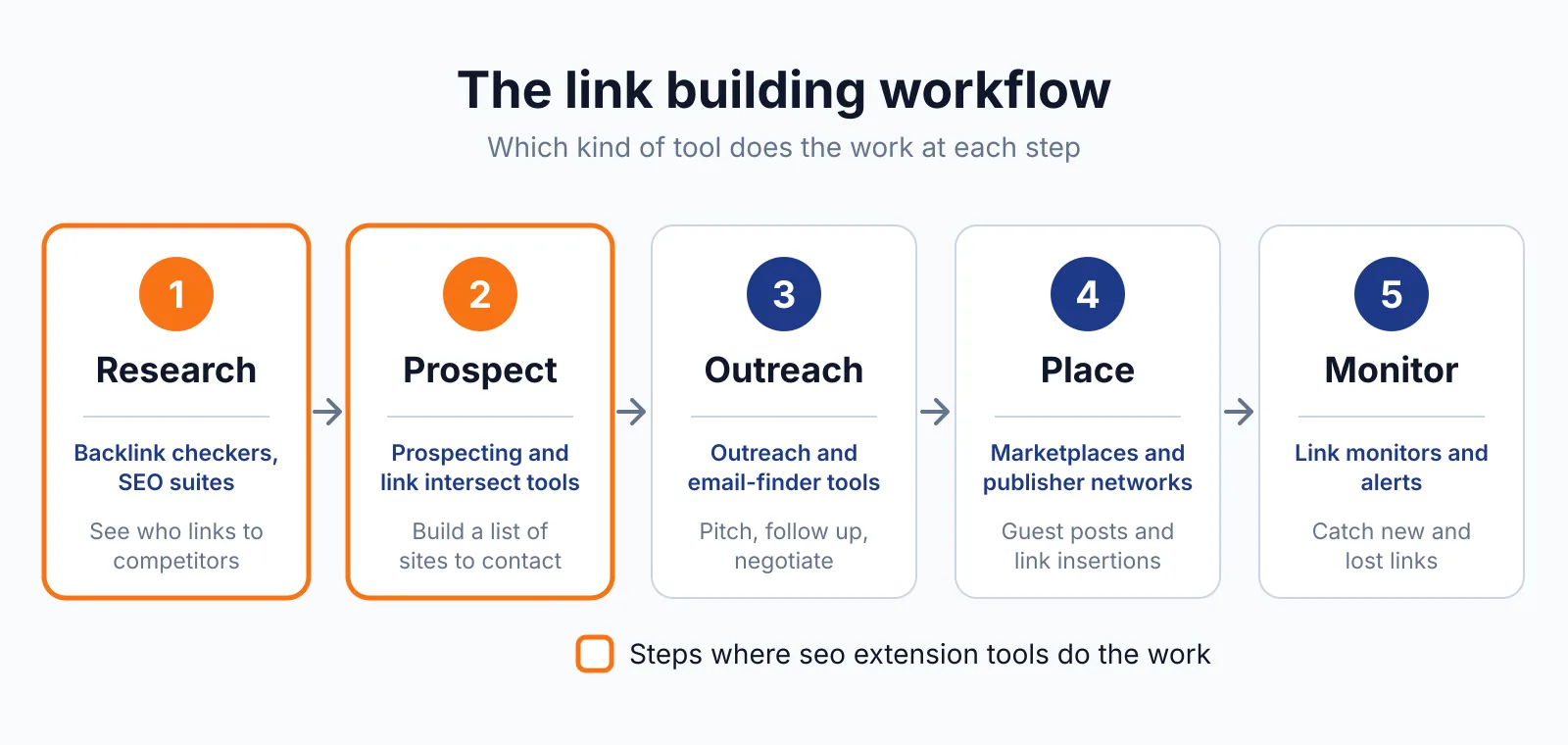
It suits anyone working through long lists of prospect sites.
TL;DR
- Free Chrome extension that opens a pasted list of URLs, one per line, each in a new tab.
- Opens URLs in new or existing tab groups, and runs a standard search for input that is not a URL.
- The name is shared by several extensions in the Chrome Web Store, so check the developer before installing.
Quick facts
| Fact | Detail |
|---|---|
| What it does | Opens a pasted list of URLs, each in a new tab |
| Best for | SEOs working through prospect or verification lists |
| Starting price | $0 |
| Free option | Free, no account or paid tier |
| Website | chromewebstore.google.com |
| Checked | November 2026 |
What Open Multiple URLs does
Open a whole list of pages at once
You paste your list into the text area, one address per line, then click Open URLs and each opens in its own tab. That turns a long prospect sheet into open tabs in one move. The extension opens tabs only.
It does not check, vet, or scrape the pages. For example, open a list of 30 guest posting prospects and shortlist the sites worth pitching. Open too many at once and Chrome slows down, so work in batches of 20 to 30.
Sort opened pages into tab groups
The extension can open URLs in new or existing tab groups, using the TabGroup permission. Grouping keeps a prospect list separate, so you can close the whole group when you finish. For example, open one list into a group called prospects and another into a group called checks.
The extension only places tabs into groups. It does not save them for later or reopen them on its own.
Handle input that is not a URL
If a line in your list is not a web address, the extension runs a standard search for it instead of failing. That saves fixing every line by hand when a list mixes domains with company names.
For example, a line that reads only a company name opens a search for that name, and you can pick the right site from the results. The extension stores your settings and input locally with the Storage permission. The developer discloses that it does not collect or use your data.
Pricing
Open Multiple URLs costs $0. There is no paid tier, no account, and no subscription, and the full source code and changelog are on GitHub. Version 1.7.5, updated 20 April 2025, is English only.
There is no stated URL limit on the listing, so the practical limit is how many tabs your browser handles at once. The extension buys, places, or guarantees no links. Any link you buy for ranking still needs rel="sponsored" or rel="nofollow" under Google's rule.
Pick it if
- You work through long lists of prospect or verification URLs.
- You want tabs grouped by batch instead of one long row.
- You want a free tool with no account and no data collection.
Not a fit if
- You need the pages checked or scored, not just opened.
- You need data pulled from the pages into a spreadsheet.
- You work in a browser other than Chrome.
Alternatives
| Tool | Why people switch | Pricing |
|---|---|---|
| Linkclump | Opens every link you drag a box around | Check current pricing on their site |
| SEO Minion | Checks on-page SEO and links in the browser | Check current pricing on their site |
| Instant Data Scraper | Pulls page data into a spreadsheet | Check current pricing on their site |
FAQ
Which Open Multiple URLs should I install?
The one this article covers is by developer tp, also known as htrinter, version 1.7.5, updated 20 April 2025. A newer, separate extension shares the name, version 1.1.4, updated 28 November 2025, with a side panel, TXT and CSV import, and drag and drop. Check the developer name before installing, because the two are different tools.
Is there a limit on how many URLs it can open?
The listing states no URL limit. The practical limit is your browser: open too many tabs at once and Chrome slows down, so work in batches of 20 to 30.
Does it check the links on the pages it opens?
No. It opens tabs and does nothing else, so it cannot tell you whether a page is worth a link or whether its outbound links are followable. If you later find a harmful link pointing at your own site, Google's disavow tool is the route for that, and it is meant only for links that are genuinely spammy.
Next step
Open your next prospect list in one move, check the shortlist with our free backlink checker, then talk to us through our contact page about link building outreach.

The BacklinkPrice Team researches backlink prices, publisher sites and link building tools. We check prices and plans against each provider's own pages and date them, so you know how current the numbers are.
More from BacklinkPrice TeamRelated guides