Similarweb Extension: What It Does, Pricing and Alternatives
The Similarweb Extension is a free browser extension from Similarweb that shows traffic and competitive data for any website you visit, in one click, with no account needed.
Similarweb Extension is a free browser extension from Similarweb that shows traffic and competitive data for any website you visit, in one click. You need no Similarweb account to use it. It suits anyone who wants a fast read on a site's traffic before outreach.
TL;DR
- Free, with no account and no paid tier for the extension itself. Deeper analysis needs a paid Similarweb plan.
- Shows visits, bounce rate, pages per session, visit duration, traffic sources, geography, keywords and AI traffic for the site you are on.
- Data is modelled from a clickstream panel, not measured, and it shows no backlink data.
Quick facts
| Fact | Detail |
|---|---|
| What it does | Shows traffic and competitive data for any site in the browser |
| Best for | SEOs who vet a prospect site's traffic before outreach |
| Starting price | $0 |
| Free option | Free forever, no account |
| Website | similarweb.com |
| Checked | November 2026 |
What Similarweb Extension does
See a site's traffic at a glance
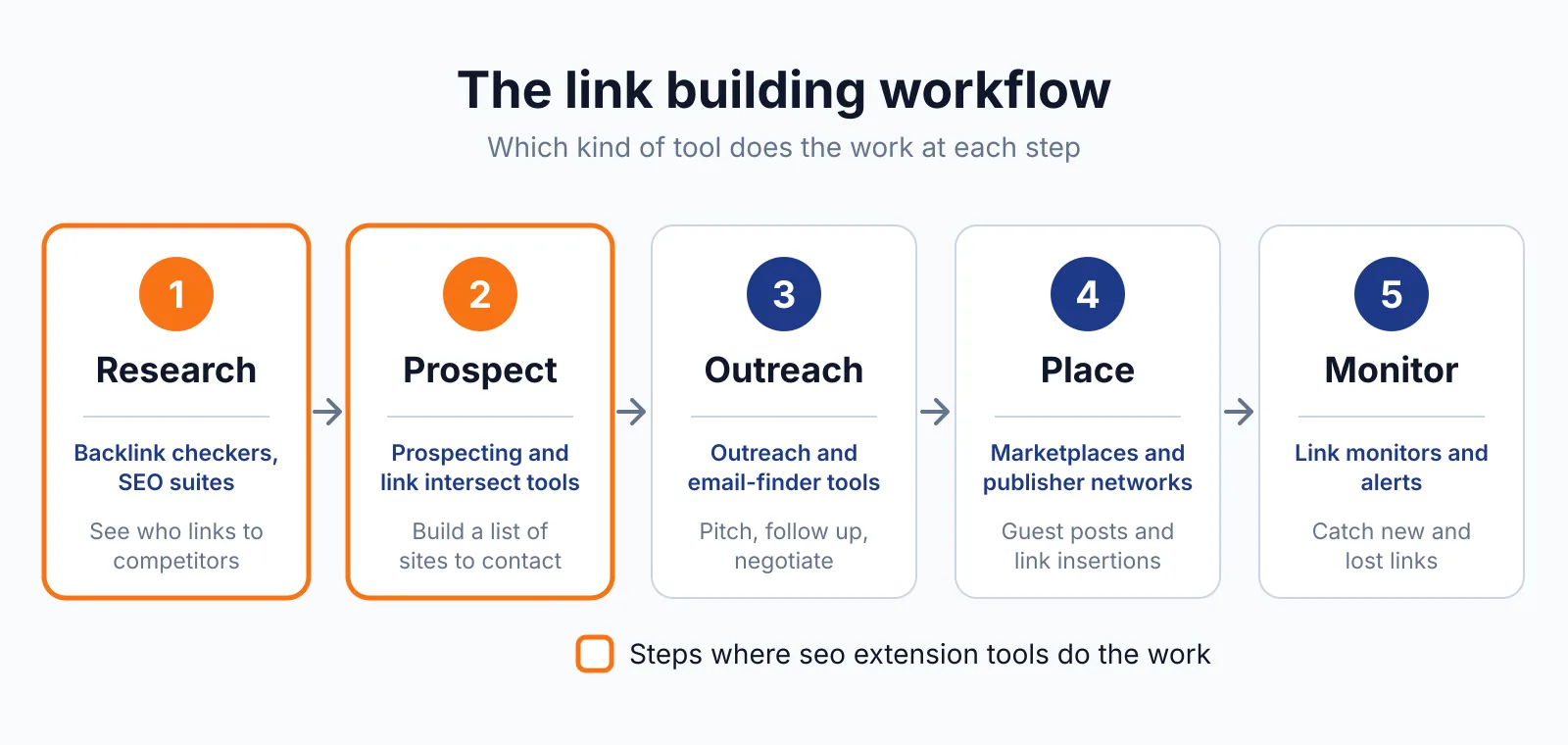
Click the Similarweb icon in the toolbar on any website and you get an instant read on its traffic. The panel shows total monthly visits, bounce rate, pages per session and average visit duration, tracked over time. You can benchmark the site against competitors from the same view.
That read matters before you pitch. The numbers are estimates, and very small sites may return only partial data.
See where the traffic comes from
The panel breaks traffic down by channel: direct, organic search, paid search, social, email, referrals and display. It also shows which countries send visits to the domain, with percentages, and the top search terms driving traffic, with estimated click volume and CPC. A ranking section shows where the site ranks globally, by country and within its category.
Together, the channel mix shows whether a site earns visits from search or buys them, and the geography shows whether its audience matches yours.
See AI traffic and top prompts
The newest part of the extension tracks AI traffic: how much of a site's visits come from ChatGPT, Gemini, Claude, Perplexity and other AI chatbots, tracked over time. Top Prompts shows the exact questions users ask AI chatbots about any brand, which tells you what people want to know before they ever reach a website.
A site that already earns visits from AI answers has an audience that finds it through a channel most traffic tools still ignore. It does not say whether the site will keep that traffic, or anything about the links on the page.
Pricing
The extension itself is free, with no paid tier and no account required. It is available for Google Chrome, Microsoft Edge, Mozilla Firefox and Opera, and it installs from each browser's own store.
The full Similarweb platform is a separate paid product: self-service packages run $199, $399 and $649 a month, with annual billing lower, and those figures are search-derived because prices did not render on the opened pricing page. A paid plan adds deeper analysis, historical data and advanced filters inside the platform.
If you want placements checked end to end, our link building outreach service covers it. Checked November 2026.
Pick it if
- You vet prospect sites by traffic before you pitch a guest post.
- You want a one-click traffic read with no account and no cost.
- You want to see AI traffic and top prompts for a brand.
Not a fit if
- You need backlink data or link attributes for a page.
- You need measured analytics rather than modelled estimates.
- You need historical data deeper than the monthly updates.
Alternatives
| Tool | Why people switch | Pricing |
|---|---|---|
| Similarweb | Full platform with history, APIs and deeper analysis | Check current pricing on their site |
| SEOquake | Adds a 28-check on-page audit and a links report | Check current pricing on their site |
| Wappalyzer | Shows the technology stack behind a site instead | Check current pricing on their site |
FAQ
Is the Similarweb Extension free?
Yes. It costs nothing, with no account and no paid tier for the extension itself. Deeper analysis, historical data and advanced filters need a paid Similarweb plan.
Does it show backlinks?
No. It shows traffic estimates, keywords, rankings and AI traffic, with no backlink data and no link attributes. For backlink data, use our free backlink checker or read our Similarweb overview, and paid links need a sponsored or nofollow label under Google's link spam rules.
How accurate is the data?
It is modelled, not measured. Similarweb builds its figures from a clickstream panel and public signals, so its numbers can differ from Google Analytics. Treat the figures as a comparison tool between sites, not as an exact count.
Data is updated monthly, and small sites may return only partial data. SEOquake is a free alternative for on-page checks and a links report.
Next step
Check what a placement on a site should cost with our price checker, then talk to us through our contact page about getting the link placed.

The BacklinkPrice Team researches backlink prices, publisher sites and link building tools. We check prices and plans against each provider's own pages and date them, so you know how current the numbers are.
More from BacklinkPrice TeamRelated guides