What Is BrightEdge? Features, Pricing and How It Helps Link Building
BrightEdge is an enterprise SEO platform that tracks backlinks, compares competitor link profiles, and turns link work into tasks. Pricing is not listed publicly.
BrightEdge is an enterprise SEO platform that tracks search performance and backlinks for large sites. It stores backlink counts over time, compares your links with rival sites, and turns the findings into tasks for a team. It is for large in-house teams and agencies that need shared reporting and a clear workflow for link work.
TL;DR
- BrightEdge pricing is not listed publicly; check their site, and the sales route is a demo or a call, checked November 2026.
- It tracks backlink counts over time by page, anchor text, category, and link type, with data from Majestic and Moz.
- It finds link hubs, which link to more than one competitor, and shows the top 10 ranking pages per keyword with their backlink portfolios.
- There is no free plan or trial stated, and no plan names or dollar figures are listed on the pricing page.
Quick facts
| Fact | Detail |
|---|---|
| What it does | Enterprise SEO platform for backlink tracking, competitor analysis, and task workflows |
| Best for | Large teams that need shared dashboards and assigned link tasks |
| Starting price | Pricing is not listed publicly; check their site |
| Free option | No free plan or trial stated |
| Website | brightedge.com |
| Checked | November 2026 |
What BrightEdge does for link building
Track backlinks over time by page
BrightEdge records backlink counts over time and lets you view them by page URL, date added, page score, anchor text, category, and type. A backlink is a link from another site to one of your pages.
This matters because a single total hides the real story, and a page that gains links steadily is easier to defend than one with a sudden spike. For example, if a guide gains five links in a month from blogs and news articles, the dashboard shows that mix.
The limit is that counts alone do not prove quality, so you still need to open the linking pages and judge relevance.
Compare your links with rival sites
BrightEdge compares backlink profiles by top-level domain, anchor text, and domain type. A top-level domain is the ending of a web address, such as .com or .org, and it helps you see whether rivals earn links from a wide spread of sites.
This matters because a rival with links from many domains may be harder to catch than one with many links from a few sites. For example, if a rival has links from 200 domains and you have links from 40, the gap tells you to widen your outreach.
The limit is that the comparison shows the shape of the gap and it does not tell you which sites will reply to you.
Find link hubs that already link to rivals
BrightEdge finds link hubs, which are domains that link to more than one competitor. This matters because a site that links to several rivals has already shown interest in your topic, so your pitch starts from shared ground.
For example, if a hub links to three rival guides, your guide can be pitched as a useful addition to the same list. The limit is that a hub may link to rivals for reasons that do not apply to you, such as a paid listing, so read the page before you pitch.
See which rival pages earn the most links
BrightEdge shows the top 10 ranking pages for a keyword and the backlink portfolio behind each page. This matters because it links rankings to links in a direct way, and it shows which page types earn links in your niche.
For example, if the top 10 pages for a keyword are mostly tools and data studies, a plain blog post may struggle to earn the same links. The limit is that the top 10 changes over time, so a snapshot from one week can look different a month later.
Turn link findings into assigned tasks
BrightEdge lets teams assign domains, set tasks, and get a notice when a backlink becomes active. This matters for large teams because link work spreads across people, and a finding that stays in a report does not become a placed link on its own.
For example, a manager can assign a list of link hubs to one person and see when each backlink goes live. The limit is that the task system tracks the work and it does not write the pitch.
BrightEdge pricing
BrightEdge pricing is not listed publicly; check their site. The pricing page gives no plan names, no dollar figures, and no free plan or trial, and the route is a demo or a call to sales. The page lists a phone number, 800-578-8023, for the sales team.
Since no price is public, there is no worked cost example to give here, and any budget figure would be a guess. Read the BrightEdge pricing page for the current sales route, and use our backlink pricing database to compare enterprise software spend with the cost of single placements.
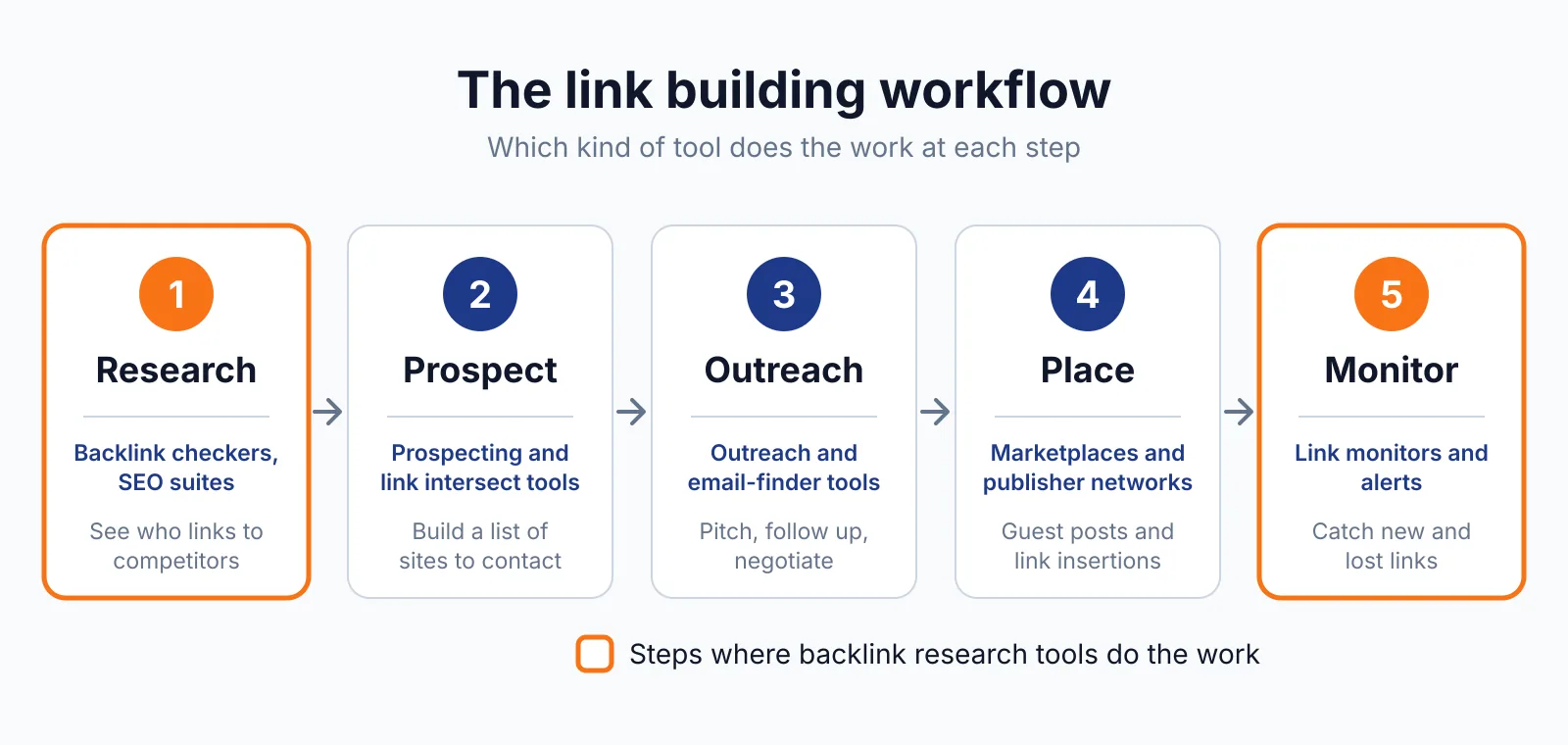
Where BrightEdge fits in a link building workflow
- Pick a keyword and look at the top 10 ranking pages and their backlink portfolios.
- List the link hubs that link to more than one rival and sort them by relevance.
- Assign the best hubs as tasks, with a clear owner and a due date for each pitch.
- Track new backlinks as they go live and check which pages gained links.
- Review the trend each month and shift effort toward the page types that earn links.
BrightEdge does not cover email outreach, contact finding, or content writing, so those steps need other tools or people. Our guest posting service covers the outreach step if your team wants to keep the research in BrightEdge.
Pick BrightEdge if
- You run a large site and want backlink tracking tied to rankings.
- You need link hubs and competitor comparisons for a team.
- You want assigned tasks and alerts when backlinks go live.
- You can work through a sales call and a custom quote.
Not a fit if
- You need a public price before you talk to sales.
- You want a free plan or a low-cost tool for one small site.
- You only need a one-off backlink check.
Alternatives
| Tool | Why people switch | Pricing |
|---|---|---|
| Ahrefs | For a large live link index with self-serve pricing | Check current pricing on their site |
| seoClarity | For an enterprise platform with Majestic data and link gap reports | Check current pricing on their site |
| Majestic | For direct access to the Fresh Index and Historical Index behind the backlink data | Check current pricing on their site |
| Moz Pro | For a lower-cost suite with link metrics and a simpler setup | Check current pricing on their site |
The BrightEdge pricing page is the source for the sales route, and the Google spam policies set the rules for link building. For the index behind the data, see Majestic, and for a second enterprise view, see the seoClarity pricing page.
FAQ
Does BrightEdge list its prices?
No, pricing is not listed publicly on the pricing page. The page directs you to a demo or a sales call, with no plan names or dollar figures shown.
What link data does BrightEdge use?
It works with integrations from Majestic and Moz. The BrightEdge page states that the Majestic Fresh Index holds 150 billion URLs and the Historical Index holds 3.8 trillion URLs.
Can BrightEdge tell me when a new backlink goes live?
Yes, the task system can notify you when a backlink becomes active. That helps a team track which pitches turned into live links.
What is a link hub in BrightEdge?
A link hub is a domain that links to more than one of your competitors. BrightEdge lists these hubs so you can pitch sites that have already linked to similar content.
Next step
Try our free SEO tools and check a link with our backlink checker, then contact us if you want help turning a hub list into placed links.

The BacklinkPrice Team researches backlink prices, publisher sites and link building tools. We check prices and plans against each provider's own pages and date them, so you know how current the numbers are.
More from BacklinkPrice TeamRelated guides