What Is LinkResearchTools? Features, Pricing and How It Helps Link Building
LinkResearchTools is a subscription tool for link audits, and Link Detox is the part that checks toxic backlinks. This overview covers its features and pricing.
LinkResearchTools is a subscription tool for link audits, with Link Detox as its main product for toxic backlinks. A toxic backlink is a link from a spammy or low quality site that can harm your site in search. It is for SEO teams and agencies who audit a link profile and clean up risky links.
TL;DR
- LinkResearchTools is a subscription tool for link audits, and Link Detox checks toxic backlinks.
- Pricing is not listed publicly; check their site.
- Link Detox combines 25+ link data sources and gives 150+ metrics per link.
- A DTOXRISK score above 1,000 usually means a penalty or a filter, per the LinkResearchTools page.
Quick facts
| Fact | Detail |
|---|---|
| What it does | Link audit tool for toxic backlinks, risk scores, and disavow files |
| Best for | SEO teams, agencies, and site owners who audit and clean up link profiles |
| Starting price | Pricing is not listed publicly; check their site |
| Free option | Trial exists with limits; no free plan stated |
| Website | linkresearchtools.com |
| Checked | November 2026 |
What LinkResearchTools does for link building
Audit toxic backlinks in a profile
Link Detox audits a link profile and gives each link a Link Detox Risk score, known as DTOXRISK. The tool combines 25+ link data sources, re-crawls them, and gives 150+ metrics per link. That mix helps you find risky links that one source alone might miss. For example, you audit a site with 5,000 backlinks and find 200 links with high risk scores. You review the top 50 first, since those links are the most likely to cause harm. A DTOXRISK score above 1,000 usually means a penalty or a filter, per the LinkResearchTools page. A high score is still a warning, so you should read the linking page before you act on it.
Test the risk of a link before you get it
Link Simulator lets you test the risk of a link before you acquire it. You enter a prospect link, and the tool estimates how that link would affect your risk score. That check helps you avoid a placement that adds risk to your profile. For example, you plan a link from a site that looks relevant, and the simulator shows a high risk for that link. You skip that site and keep a second prospect that shows a lower risk. The simulator gives an estimate, and it does not give a final verdict on a link. You still need to read the site, check its recent content, and judge whether it fits your niche.
Build a disavow file for risky links
Link Detox builds an automatic disavow file in Google format, with a history of past files. A disavow file tells Google to ignore certain links when it assesses your site. Google explains which link schemes it treats as spam in its spam policies. For example, you audit a site and mark 120 links for disavow after a manual review. You export the file, upload it in Google Search Console, and keep the history so you can change it later. A disavow file does not remove links from the web, and it only asks Google to ignore them. You should also try to remove the worst links at the source, since a disavow file is a second step, not a fix on its own.
Screen new prospects and check anchor text
Link Detox Screener screens new link prospects, and the tool classifies anchor text for links in a profile. Anchor text is the clickable text of a link, and a profile with too many exact match anchors can look unnatural. The screener helps you check a prospect before you pay for it. For example, you screen 30 prospects for a campaign and find 5 with high risk scores. You drop those 5, and you check the anchor text for the rest to avoid repeating the same keyword. The screener gives a risk view, and it does not tell you whether a site will accept your pitch. You still need to contact the site, agree terms, and check that the link stays live after it goes up.
LinkResearchTools pricing
Pricing is not listed publicly; check their site. The pricing page says products are subscription-based, with billing monthly, quarterly, bi-annual, or annual, checked November 2026.
| Plan | Price | Key limit |
|---|---|---|
| Billing cycles | Monthly, quarterly, bi-annual, or annual | Varies by plan |
| Payment methods | Visa, Mastercard, Amex, PayPal, SEPA, and invoice for annual accounts | See pricing page |
| Trial | Trial exists | No export of data, no Link Detox Boost, limited to plan Link Crawl Budget |
| Starting price | Pricing is not listed publicly; check their site | Ask for a quote before you budget |
A worked cost example is not possible here, since no price is listed on the pricing page. You need to ask for a quote and check the Link Crawl Budget for the plan you choose.
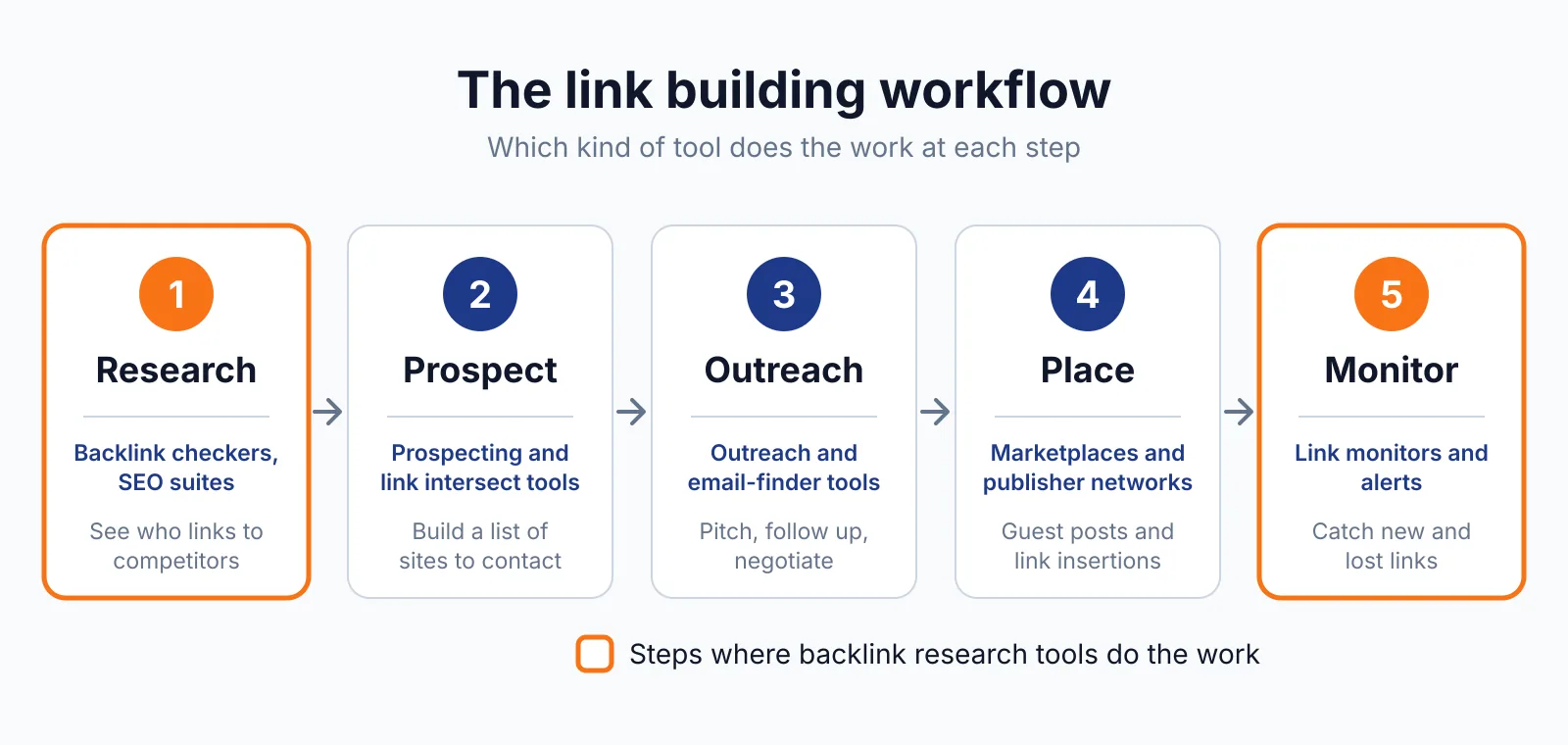
Where LinkResearchTools fits in a link building workflow
- Connect Google Search Console and Google Analytics, and import link data from Ahrefs, SEMrush, Moz, or SISTRIX.
- Run a Link Detox audit and sort links by DTOXRISK, starting with the highest scores.
- Test new prospects with Link Simulator before you acquire a link.
- Screen prospects with Link Detox Screener, then send outreach for guest posting or a resource link.
- Build a disavow file for risky links, upload it, and keep the history for later audits.
It does not cover outreach email, and it does not write content for you. You still need to pitch each site, write the post or page, and agree terms with the site owner.
Pick LinkResearchTools if
- You need a deep audit of toxic backlinks.
- You want a risk score and a simulator before you get a link.
- You want an automatic disavow file with a history.
- You work with data from several link tools at once.
Not a fit if
- You want a public price list before you talk to sales.
- You only need a quick backlink count for a small site.
- You want outreach email built into the same tool.
Alternatives
We checked the Mangools pricing page and the SISTRIX pricing page while comparing options, and both list public prices in a different range from LinkResearchTools. The table below lists tools people often compare with LinkResearchTools.
| Tool | Why people switch | Pricing |
|---|---|---|
| Ahrefs | For a large cloud backlink index | Check current pricing on their site |
| SISTRIX | For a cloud suite with link data | Check current pricing on their site |
| Majestic | For a deep historic backlink index | Check current pricing on their site |
| SEO PowerSuite | For a desktop suite with a disavow workflow | Check current pricing on their site |
FAQ
What is Link Detox Boost?
Link Detox Boost is a feature in LinkResearchTools, and the trial does not include it. The pricing page lists it as a trial limit, along with no export of data and a limit on Link Crawl Budget. You should check the plan details before you buy.
Can I import data from other link tools?
Yes, LinkResearchTools lets you import link data through APIs from Ahrefs, SEMrush, Moz, and SISTRIX. You can also connect Google Search Console and Google Analytics. That mix helps you audit a profile with more sources.
What is DTOXRISK?
DTOXRISK is the Link Detox Risk score for a link, and a score above 1,000 usually means a penalty or a filter, per the LinkResearchTools page. It is a risk score, not proof of a penalty, and you should read the linking page before you disavow a link. You can check a profile with our backlink checker first.
Next step
Try our free SEO tools to check a backlink profile and compare prices in our backlink pricing database before you choose a tool. If you want help with outreach, use our contact page to tell us about your site and your goals.

The BacklinkPrice Team researches backlink prices, publisher sites and link building tools. We check prices and plans against each provider's own pages and date them, so you know how current the numbers are.
More from BacklinkPrice TeamRelated guides