What Is Monitor Backlinks? Features, Pricing and How It Helps Link Building
Monitor Backlinks watches the links pointing to your site and alerts you when one appears, disappears or changes, so you can act before a client notices.
Monitor Backlinks is a backlink monitoring tool that watches the links pointing to your site and tells you when one appears, disappears or changes. It started as a standalone product in 2012, and SEOptimer acquired it in 2023 and folded its best features into the core SEOptimer platform. The legacy tool still works.
It fits agencies and in-house SEOs who already build links and want to know fast when a placement dies.
TL;DR
- Monitor Backlinks tracks new, lost and changed links for your domains, with a detailed table for every link gained or lost.
- Prices start at $39 a month for the White Label plan, or $29.25 a month billed annually, based on a crawl of the official pricing page.
- A 14-day free trial is offered, with no permanent free plan.
- It watches links you already have. It does not find prospects or send outreach.
Quick facts
| Fact | Detail |
|---|---|
| What it does | Monitors backlinks and alerts you when links change |
| Best for | Agencies and in-house teams checking client link placements |
| Starting price | $39 per month, or $29.25 per month billed annually |
| Free option | 14-day free trial; no free plan |
| Website | monitorbacklinks.com |
| Checked | November 2026 |
What Monitor Backlinks does for link building
Catch lost links before a client does
Monitor Backlinks checks the links pointing to your domains and records each one as new, lost or changed, with a detailed table for every link gained or lost. That matters because a placement that goes dead quietly still counts in your report until someone checks it.
For example, a guest post link placed in March can vanish in June when the host site redesigns its pages. The tool flags the loss, so you can ask the owner to restore it or replace it instead of finding out at the next monthly report.
One limit is that the tool reports the change, it does not fix it. You still need to contact the site owner or find a replacement yourself.
Spot anchor text that looks out of balance
The tool flags anchor text ratios across your link profile, so you can see when too many links use the same exact match keyword. Anchor text is the clickable text of a link, and a profile where every link says the same commercial phrase looks planned.
For example, if 40 of your last 50 links all use the same money keyword as anchor text, the flag tells you to vary the next round with brand and generic anchors.
One limit is that the tool shows the ratio, it does not tell you the safe number. You still need to judge what fits your niche and your history.
Get alerted the day a link changes
Monitor Backlinks sends real-time alerts when a tracked link changes status, so you do not need to open the dashboard every day. A change can be a link that flipped from dofollow to nofollow, a page that now returns a 404, or a link removed from the page.
Dofollow passes ranking signals by default, while nofollow tells search engines not to pass them.
For example, a link insertion you paid for can switch to nofollow a week later without notice. An alert that same day gives you time to ask the publisher to restore it while the deal is fresh.
One limit is that alerts only cover links you added to the tool. Links you never tracked will not trigger anything.
Keep a record you can show a client
The tool keeps a table of referring domains and backlinks with metrics for each one, so you can show a client what was built, what is live and what was lost. Referring domains are the separate websites that link to you.
For example, a monthly report can list 12 new links, 2 lost links and the current anchor mix from one dashboard, instead of screenshots from three tools.
One limit is that the tool is a monitor, not a full reporting suite. You may still need another tool for charts and white label client reports.
Monitor Backlinks pricing
Prices run from $39 to $59 a month, with custom enterprise pricing on top, based on a crawl of the official pricing page in November 2026. The homepage returned an access error in this session, so confirm these figures on monitorbacklinks.com before you buy.
| Plan | Monthly price | Annual price | Best for |
|---|---|---|---|
| White Label | $39 per month | $29.25 per month | Marketers who want branded reports |
| Lead Generation | $59 per month | $44.25 per month | Agencies tracking links for clients |
| Enterprise | Custom | Custom | Special use cases and large teams |
A worked example: White Label billed annually costs $351 a year, $117 less than $39 a month for 12 months. Lead Generation at $44.25 a month billed annually costs $531 a year, against $708 monthly.
One conflict to note: a third-party comparison from September 2026 lists legacy Monitor Backlinks from $25 a month, and older listings quote $18 and $19.99 a month. Those do not match the official page crawl, so check the site first.
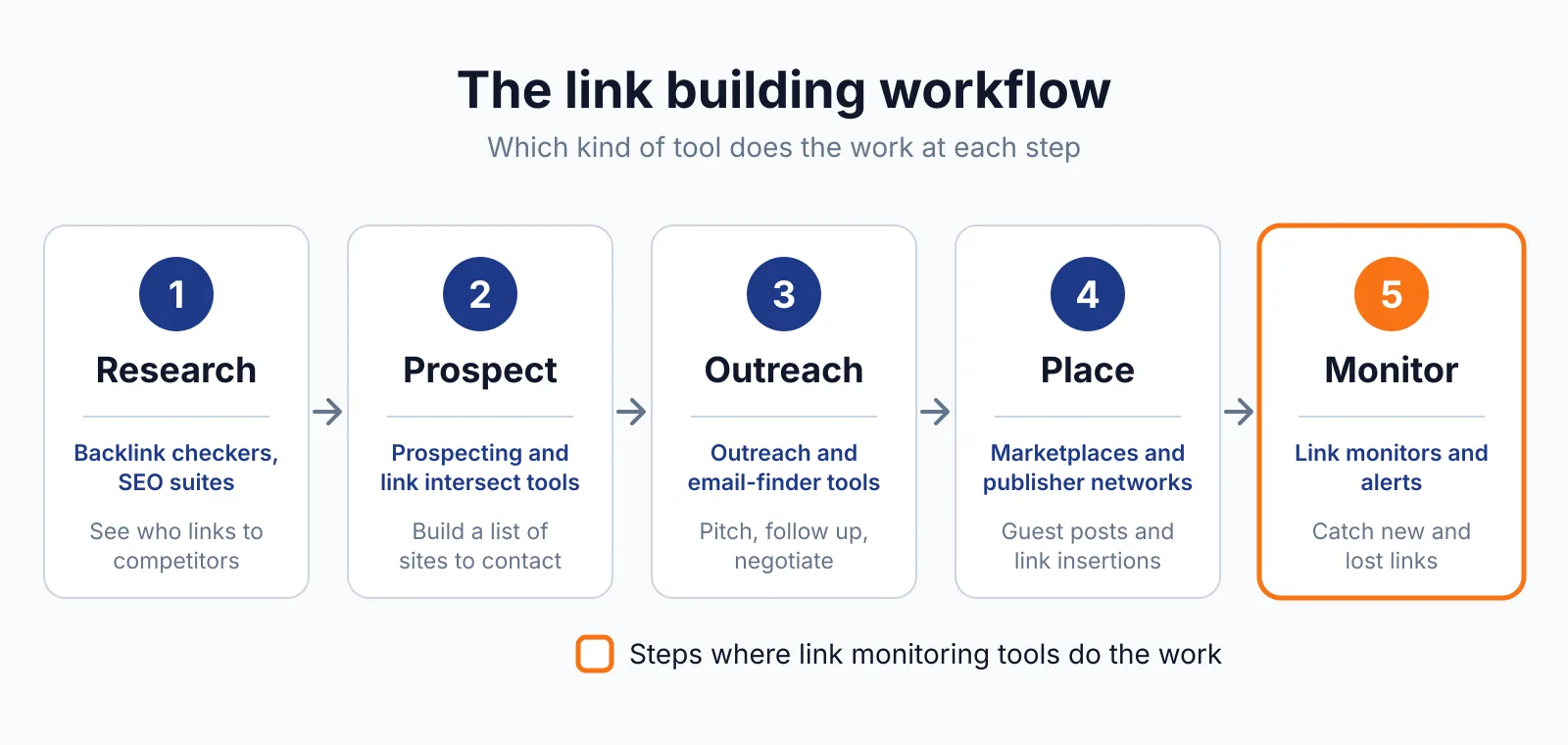
Where Monitor Backlinks fits in a link building workflow
- Place your links through guest posts, link insertions or digital PR, using our guest posting service or link insertion service.
- Add each placement to Monitor Backlinks with its target URL and anchor text.
- Let the tool check the links and alert you when one changes or disappears.
- Act on the alert: ask the publisher to restore the link, or plan a replacement placement.
- Pull the monthly table of gained and lost links into your client report.
It does not cover prospecting, outreach or writing, so you still need other tools to find sites and pitch them. Our free backlink checker can spot new links before you add them to the tracker.
Pick Monitor Backlinks if
- You manage links for several clients and need to know fast when one dies.
- You want anchor text ratios checked without opening a full SEO suite.
- You already use SEOptimer and want the monitoring in the same place.
Not a fit if
- You need a tool that finds link prospects or sends outreach emails.
- You want a permanent free plan rather than a 14-day trial.
- You want active development on a standalone product, since future work sits inside SEOptimer.
Alternatives
| Tool | Why people switch | Pricing |
|---|---|---|
| LinkChecker.PRO | Daily checks plus Google index status and budget tracking | Check current pricing on their site |
| Linkody | 24-hour checks with competitor link monitoring included | Check current pricing on their site |
| Ahrefs | A full backlink index with prospecting and content tools | Check current pricing on their site |
| SEOptimer | The platform Monitor Backlinks now lives in, with audits and white label reports | Check current pricing on their site |
FAQ
Is Monitor Backlinks still a standalone tool?
Yes, the legacy tool still works for existing users, but SEOptimer acquired it in 2023 and its best features now live inside the core SEOptimer platform.
Does Monitor Backlinks buy or place links?
No. It monitors links you already have and does not buy or place links. Any link bought for ranking still needs rel="sponsored" or rel="nofollow" under Google's spam policies.
What happens when a link is lost?
The tool flags it in the lost links table and sends an alert if you have alerts on. You can then ask the site owner for the link back, or replace it with a new placement.
Can I try it free?
Yes, a 14-day free trial is advertised on the official page. There is no permanent free plan, so the trial is the only way to test it before paying.
Next step
If you already build links and want a simple way to watch them, try the 14-day trial and add your live placements first. For help with placements, see our link building outreach service or contact us.

The BacklinkPrice Team researches backlink prices, publisher sites and link building tools. We check prices and plans against each provider's own pages and date them, so you know how current the numbers are.
More from BacklinkPrice TeamRelated guides