What Is LinkChecker.PRO? Features, Pricing and How It Helps Link Building
LinkChecker.PRO is a backlink monitoring platform that re-checks your links daily and alerts you when one is lost, broken or nofollowed.
LinkChecker.PRO is a dedicated backlink monitoring platform for SEO teams and agencies. You add the links you built or bought, and it re-checks them daily so you know when one disappears, breaks or loses value.
It does not buy links or place links, and it has no index of its own: you import placements or pull them from Ahrefs, Majestic or Moz.
TL;DR
- Daily backlink checks with instant alerts when a link is deleted, broken or nofollowed.
- Plans run $25 to $360 a month, priced by how many backlinks you monitor.
- Google index status of each referring page is re-checked every 5 days.
- No free plan and no free trial are stated, though free Chrome tools exist.
Quick facts
| Fact | Detail |
|---|---|
| What it does | Monitors backlinks daily and alerts you when they change, break or vanish |
| Best for | SEO teams and agencies managing large sets of built or bought links |
| Starting price | $25 a month for the Lite plan |
| Free option | No free monitoring plan or trial; free Chrome extension and free tools exist |
| Website | linkchecker.pro |
| Checked | November 2026 |
What LinkChecker.PRO does for link building
Catch a lost or broken link the day it happens
LinkChecker.PRO checks your site's backlinks daily and scans Google's index every 5 days to verify each referring page. The moment a link is deleted, breaks, loses SEO value, gets nofollowed or runs into a robots.txt, noindex or canonical issue, you get an instant alert.
That speed matters because a dead link keeps costing you while you do not know about it: a placement you paid for can vanish, and a link you earned can break when a site redesigns. Daily checks turn that from a quarterly surprise into a same-day fix.
For example, an agency tracking 800 client links could get an alert on Tuesday that a DR 60 placement went 404 after the publisher moved the article, then ask for a replacement while the publisher still remembers the deal.
One limit is that the tool only watches links you added: it will not find new links you never told it about.
Prove link work to clients and team members
Team Management tracks per-link-builder performance stats, and a Project Statistics dashboard shows the state of each project at a glance. That turns link monitoring into evidence: you can show a client which links are live, which were lost and what was replaced, and you can see which team member's placements hold up best.
The Budget Tracker ties it to money, comparing link cost against lost and deleted links so you can see what a dead placement actually cost you.
For example, a team lead could open the dashboard before a client call, see 12 links lost out of 400 in the past month, and show the 3 already replaced and the 9 in progress. One limit is that the stats only cover links inside the tool, so placements tracked elsewhere will not show up in the numbers.
Check a competitor's backlinks in bulk
Batch Analysis lets you check competitor backlink profiles, metrics and index status in bulk, with batch URL, IP, Whois, Wayback and index checks. You can see which of a rival's links are still live, which pages are indexed and which have dropped out of Google's index, then decide which of their wins are worth chasing for yourself.
Brand Mentions adds another angle: it finds unlinked mentions of your brand so you can ask for a link to be added.
For example, a link builder could run a batch check on a competitor's top 200 referring domains, find 40 pages that are no longer indexed, and skip those targets in favour of the ones still live. One limit is that batch checks are metered per tier, so a large profile can eat the quota fast.
Spot links and notices you did not ask for
LinkChecker.PRO watches for more than lost links. Link Insertion Alerts tell you when someone adds a backlink into your article without approval, and DMCA Alerts warn you about takedown notices against your article. Redirect alerts flag changes to the redirect status of your links, and the Google index check catches pages that drop out of the index.
These alerts matter because a link can change without anyone telling you: a nofollow can appear, a redirect can break, or a page can be de-indexed, and each of those cuts the value of the placement.
For example, a site owner could learn that a guest post link was switched to nofollow two weeks after publication, then raise it with the publisher while the deal is still fresh. One limit is that the tool alerts you to the change but cannot fix it for you: the follow-up with the publisher is still your job.
Keep costs visible with a budget tracker
The Budget Tracker records what each link cost and sets it against lost and deleted links, so you can see the real cost of a link that only lived for three months. That helps agencies price their work honestly and helps in-house teams argue for replacement budgets.
Official integrations with Ahrefs, Majestic and Moz let you pull placements in rather than adding them by hand, and the free Chrome extension, Link Reader and Anchor Analyser give you quick checks without a subscription.
For example, an agency could show a client that $2,000 of placements went dead in a quarter and that $1,600 of it was replaced under warranty, which makes the next invoice easier to defend.
One limit is that there is no public API documented: the API wording on the site concerns connecting your own Ahrefs, Majestic or Moz access, so you cannot assume a full API exists.
LinkChecker.PRO pricing
Prices run $25 to $360 a month, billed per monitored backlink, with custom plans on request. Lite costs $25 a month for 400 monitored backlinks, 100 monitored redirects, 200 rescans a month, 4,000 batch URL, IP, Whois and Wayback checks, 800 batch index checks, 1 user and 3 SEO tools.
Standard costs $50 a month for 1,000 monitored backlinks, 300 redirects, 300 rescans, 10,000 batch checks of each type, 2,000 batch index checks and 5 users. Pro costs $100 a month for 2,500 monitored backlinks, 600 redirects, 500 rescans, 25,000 batch checks of each type, 5,000 batch index checks and 15 users.
Above Pro sit four unnamed tiers at $153, $220, $256 and $360 a month, covering 4,500, 6,500, 8,000 and 12,000 monitored backlinks, with 22, 20, 30 and 40 users. The upper tiers have no plan names on the page, so we do not invent any.
Annual billing saves around 20 percent, with yearly rates of $20.80, $41.70, $83.30 and $127.50 a month on Lite, Standard, Pro and the 4,500-link tier.
| Plan | Monthly price | Monitored backlinks | Users |
|---|---|---|---|
| Lite | $25 | 400 | 1 |
| Standard | $50 | 1,000 | 5 |
| Pro | $100 | 2,500 | 15 |
| Unnamed tier | $153 | 4,500 | 22 |
| Unnamed tier | $220 | 6,500 | 20 |
| Unnamed tier | $256 | 8,000 | 30 |
| Unnamed tier | $360 | 12,000 | 40 |
A worked example: on Standard at $50 a month for 1,000 monitored backlinks, you pay about 5 cents per link per month, so a 400-link client profile fits on Lite at $25 a month while a 3,000-link agency portfolio needs Pro at $100 a month.
There is no free plan and no free trial stated on the homepage, and several third-party checks of the same page agree. A 7-day refund is mentioned in third-party comparisons, though that is not stated on the site itself. The free Chrome extension and free tools are separate from the paid monitoring plans.
See the LinkChecker.PRO homepage for the current plan table, and use our price checker to compare monitoring costs with placement costs.
Where LinkChecker.PRO fits in a link building workflow
- Import your placements from Ahrefs, Majestic or Moz, or add them by hand after each guest posting campaign.
- Let the tool check them daily and re-check Google index status every 5 days.
- Act on alerts the same day: ask a publisher to fix a broken link or replace a dead one.
- Use the Budget Tracker to record what each lost link cost and what the replacement is worth.
- Review Team Management stats each month to see whose placements hold up best.
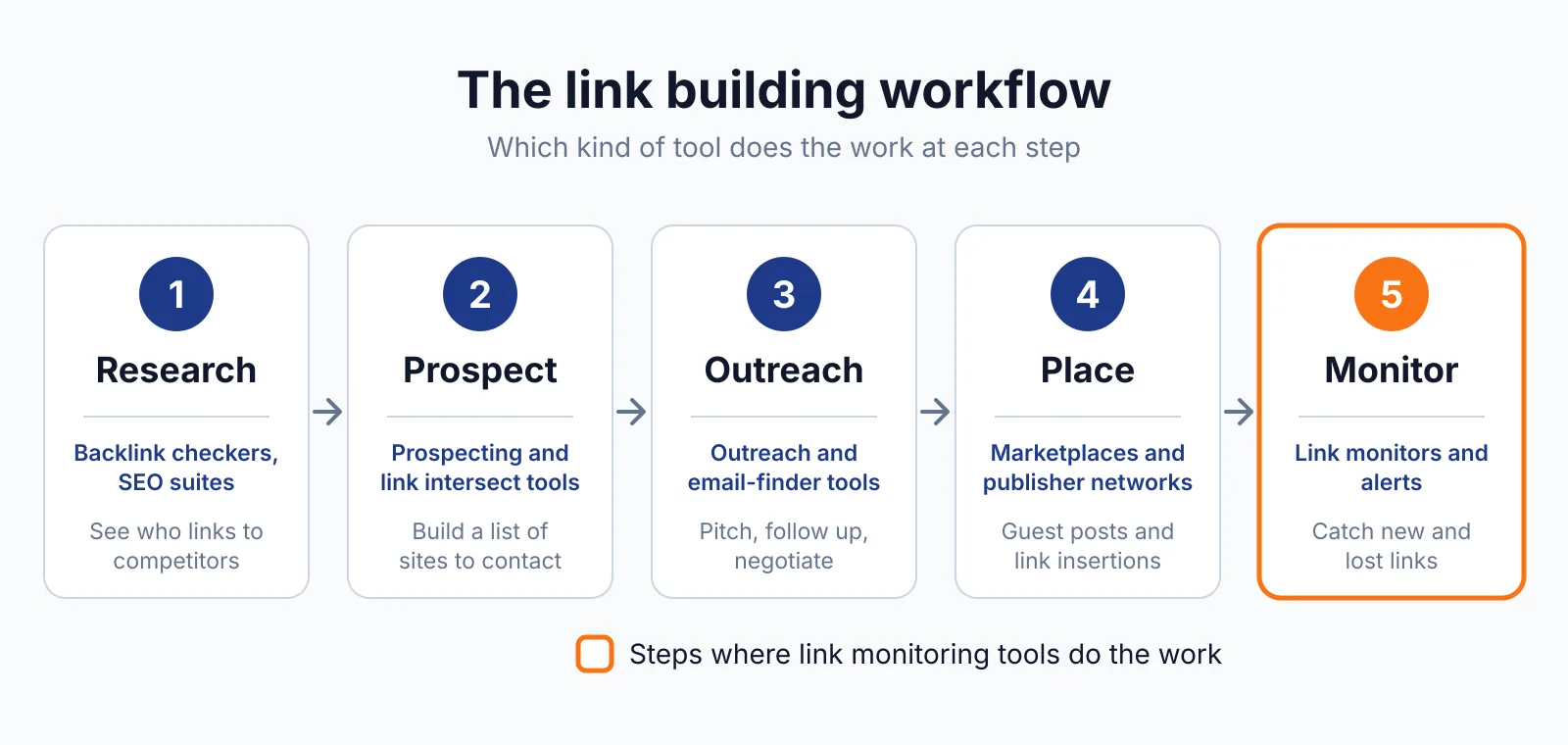
It does not cover prospecting, outreach or content creation, so you still need tools for finding sites and winning the link in the first place.
Pick LinkChecker.PRO if
- You manage hundreds or thousands of links for clients or your own sites
- You need same-day alerts when a link dies, breaks or gets nofollowed
- You want per-builder stats and a budget view of lost links
- You already use Ahrefs, Majestic or Moz and want placements pulled in
Not a fit if
- You only track a handful of links and a free checker is enough
- You need a backlink index of your own, since this tool has none
- You want a free plan or a free trial of the monitoring itself
- You need a documented public API
Alternatives
| Tool | Why people switch | Pricing |
|---|---|---|
| Linkody | Simpler daily monitoring with a 30-day free trial | Check current pricing on their site |
| Ahrefs | Full backlink index plus monitoring in one suite | Check current pricing on their site |
| Majestic | Deep backlink index with its own link metrics | Check current pricing on their site |
| Moz Pro | Link tracking inside a wider SEO suite | Check current pricing on their site |
FAQ
Does LinkChecker.PRO find backlinks for you?
No. It has no index of its own, so it only monitors links you add or pull in from Ahrefs, Majestic or Moz. It tells you when a link dies, gets nofollowed or drops out of Google's index so you can replace it or ask for a refund. That is the whole job: monitoring, not discovery.
For a simpler alternative with a free trial, see our Linkody overview.
What happens when a link gets nofollowed?
You get an instant alert when a dofollow link switches to nofollow, and the tool tracks dofollow versus nofollow status as a core metric. Google's rule is that paid links need rel="sponsored" or "nofollow", and that rule still applies to any link bought for ranking.
LinkChecker.PRO buys or places no links itself, so it only reports the change for you to act on.
Is there a free trial?
No free plan and no free trial are stated on the homepage. The free Chrome extension, Link Reader and Anchor Analyser exist, though they are free tools rather than a free monitoring plan.
How often are links checked?
Backlinks are checked daily, and Google index status of referring pages is scanned every 5 days. Rescan and batch-check quotas are metered per tier, so check your plan limits before running large batches.
Next step
If you already have links worth protecting, import them and let daily checks catch problems early. If you want help building links that are worth monitoring, look at our link building outreach, our backlink checker tool and our pricing to see how the pieces fit.

The BacklinkPrice Team researches backlink prices, publisher sites and link building tools. We check prices and plans against each provider's own pages and date them, so you know how current the numbers are.
More from BacklinkPrice TeamRelated guides