How to Use Ahrefs for Link Building: Step-by-Step (2026)
Use Site Explorer for backlink research, Link Intersect for gap prospects, broken backlink reports for outreach, and Alerts to track new and lost links.
To use Ahrefs for link building, start in Site Explorer to study your own and competitors' backlinks, use Link Intersect to find sites that link to competitors but not to you, and use Content Explorer and broken-link reports to find outreach targets.
Then track new and lost links with Alerts. As of November 2026, paid plans start at $129 per month for Lite, and some link-building reports require Standard or higher.
Key takeaways
- Site Explorer is the core tool: it shows backlinks, referring domains, anchors, and top linked pages for any site.
- Link Intersect finds sites that link to several competitors but not to you, which makes it one of the fastest ways to build a prospect list.
- Ahrefs' pricing page lists Lite at $129 per month, Standard at $249, and Advanced at $449, as of November 2026.
- Content Explorer, Batch Analysis, and broken backlink reports are listed for Standard and higher plans, not Lite.
- Ahrefs Webmaster Tools is a free option for checking backlinks to sites you own and verify.
What Ahrefs can and cannot do for link building
Ahrefs helps you find, analyze, and monitor links; it does not build links for you. You still need content worth linking to and outreach.
What it does well:
- Shows who links to any website or page.
- Compares link profiles between competitors.
- Finds broken pages with backlinks that you can replace.
- Finds content on a topic that earned many links.
- Alerts you to new and lost backlinks.
What it does not do:
- Send outreach emails.
- Guarantee that its metrics, such as Domain Rating, match how Google ranks sites. DR is Ahrefs' own score.
For background on the metric, see what is Domain Rating.
Ahrefs plans and link building features
Choose a plan based on the reports you need. This table summarizes features listed on Ahrefs' pricing page as of November 2026; check the page for current limits.
| Plan | Monthly price | Useful for link building | Notable limits |
|---|---|---|---|
| Ahrefs Webmaster Tools | Free | Backlinks to your own verified sites | Your sites only |
| Starter | $29 | Basic Site Explorer and Keywords Explorer access | Limited data |
| Lite | $129 | Site Explorer, Alerts, Site Audit | No Content Explorer or Batch Analysis |
| Standard | $249 | Adds Content Explorer, Batch Analysis, broken backlinks and outgoing links reports | 2 years of history |
| Advanced | $449 | More history, projects, and data | Higher cost |
Third-party listings, such as Capterra's Ahrefs pricing page, show the same Lite and Standard prices. TechRadar's review notes that Ahrefs revamped its pricing for 2026 with several tiers and add-ons.
Step-by-step: how to use Ahrefs for link building
Work through these steps in order to go from research to a live prospect list.
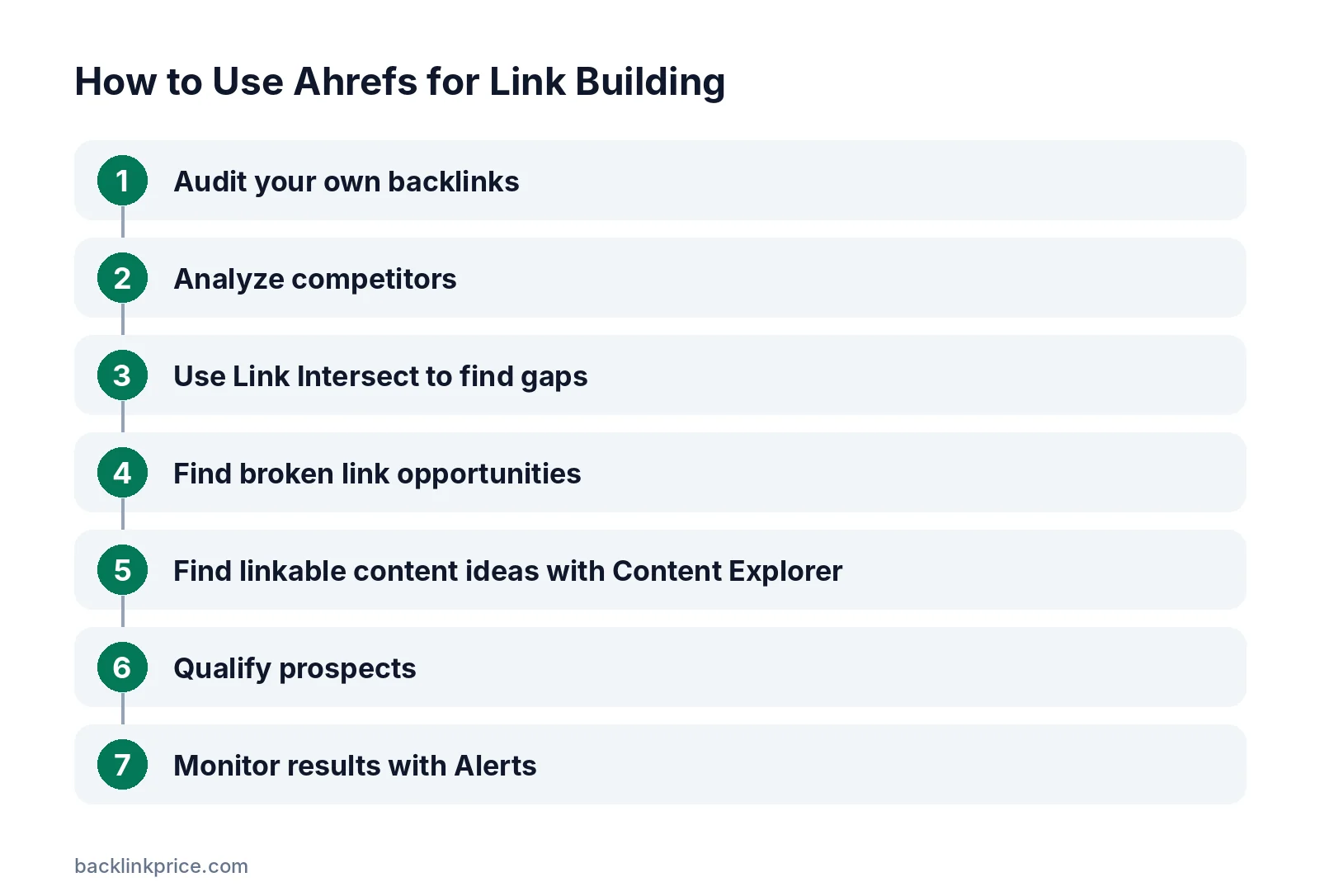
Step 1: Audit your own backlinks
Open Site Explorer, enter your domain, and review the Backlinks and Referring domains reports. Note your strongest pages, your anchor text mix, and any obviously spammy links.
If you only need your own sites, Ahrefs Webmaster Tools offers backlink data for verified sites for free.
Step 2: Analyze competitors
Enter 3 to 5 competitors in Site Explorer. Check their Best by links report to see which pages earn the most links, and their Referring domains to see who links to them.
Our guide on how to analyze competitor backlinks explains what to look for.
Step 3: Use Link Intersect to find gaps
Open Link Intersect, enter your competitors, and add your own domain to exclude. The report lists sites that link to competitors but not to you.
These sites already link to your topic, so they are warmer prospects than random sites. See how to do a backlink gap analysis.
Step 4: Find broken link opportunities
On Standard plans and above, use the broken backlinks report on competitor sites. It shows dead pages that still have links. Create a better replacement and contact the linking sites. The full method is in what is broken link building.
Step 5: Find linkable content ideas with Content Explorer
On Standard plans and above, search a topic in Content Explorer and sort by referring domains. This shows which formats earn links in your niche.
Step 6: Qualify prospects
Check each prospect's traffic, relevance, and outgoing links. Avoid sites with steep traffic drops or thousands of unrelated outbound links. Our checklist on how to vet a guest post site works for any prospect.
Remember that copying a competitor's links includes copying their mistakes. Google's spam policies treat paid and manipulative links as link spam, so skip prospects that only sell placements.
Step 7: Monitor results with Alerts
Set up Alerts for new and lost backlinks to your site. Lost links you notice quickly are easier to recover.
Tips for better results
These habits get more from the tool.
- Filter backlink reports to "dofollow" and "one link per domain" to see unique, followed links.
- Export prospects to a spreadsheet and add notes before outreach.
- Use referring domains, not total backlinks, as the main growth metric.
- Compare metrics over time rather than chasing a single DR number.
Alternatives to Ahrefs
Other tools cover similar tasks with different databases. Semrush, Moz, and Majestic all offer backlink research.
For a free baseline, Google Search Console's Links report shows top linking sites to your own property. Results differ between tools because each runs its own crawler.
Common mistakes
These mistakes waste Ahrefs data.
- Treating DR as a Google ranking factor.
- Building prospect lists without checking relevance.
- Ignoring lost links until traffic drops.
- Copying every competitor link, including spammy ones.
- Paying for Advanced when Lite or Standard covers your needs.
Frequently Asked Questions
Is Ahrefs worth it for link building?
It is worth it if you run regular link building, because Site Explorer and Link Intersect save many hours of research. If you only need data on your own sites, the free Ahrefs Webmaster Tools may be enough. Many small sites start with Lite and upgrade later.
Which Ahrefs plan do I need for link building?
Lite covers Site Explorer, backlink research, and Alerts. If you need Content Explorer, Batch Analysis, or broken backlink reports, Ahrefs lists those for Standard and higher as of November 2026. Check the pricing page, because features and limits change.
Is Domain Rating the same as Google's ranking?
No, Domain Rating is Ahrefs' own measure of a site's backlink profile strength. Google does not use DR. It is useful for comparing sites, but you should also judge relevance, traffic, and link quality.
Can I use Ahrefs for free?
Ahrefs Webmaster Tools is free for sites you own and verify, and it shows backlink and site audit data for those sites. Competitor research requires a paid plan.
How often does Ahrefs update backlink data?
Ahrefs crawls the web continuously and adds new backlinks as its crawler finds them. Recently created links may take some time to appear, and different tools will show different numbers because each uses its own crawler.
Sources

The BacklinkPrice Team researches backlink prices, publisher sites and link building tools. We check prices and plans against each provider's own pages and date them, so you know how current the numbers are.
More from BacklinkPrice TeamRelated guides