"Piktochart: What It Does, Pricing and Alternatives"
"Piktochart is a visual communication platform for infographics, reports and presentations. It makes the asset you publish on your own site, where other sites can link to it."
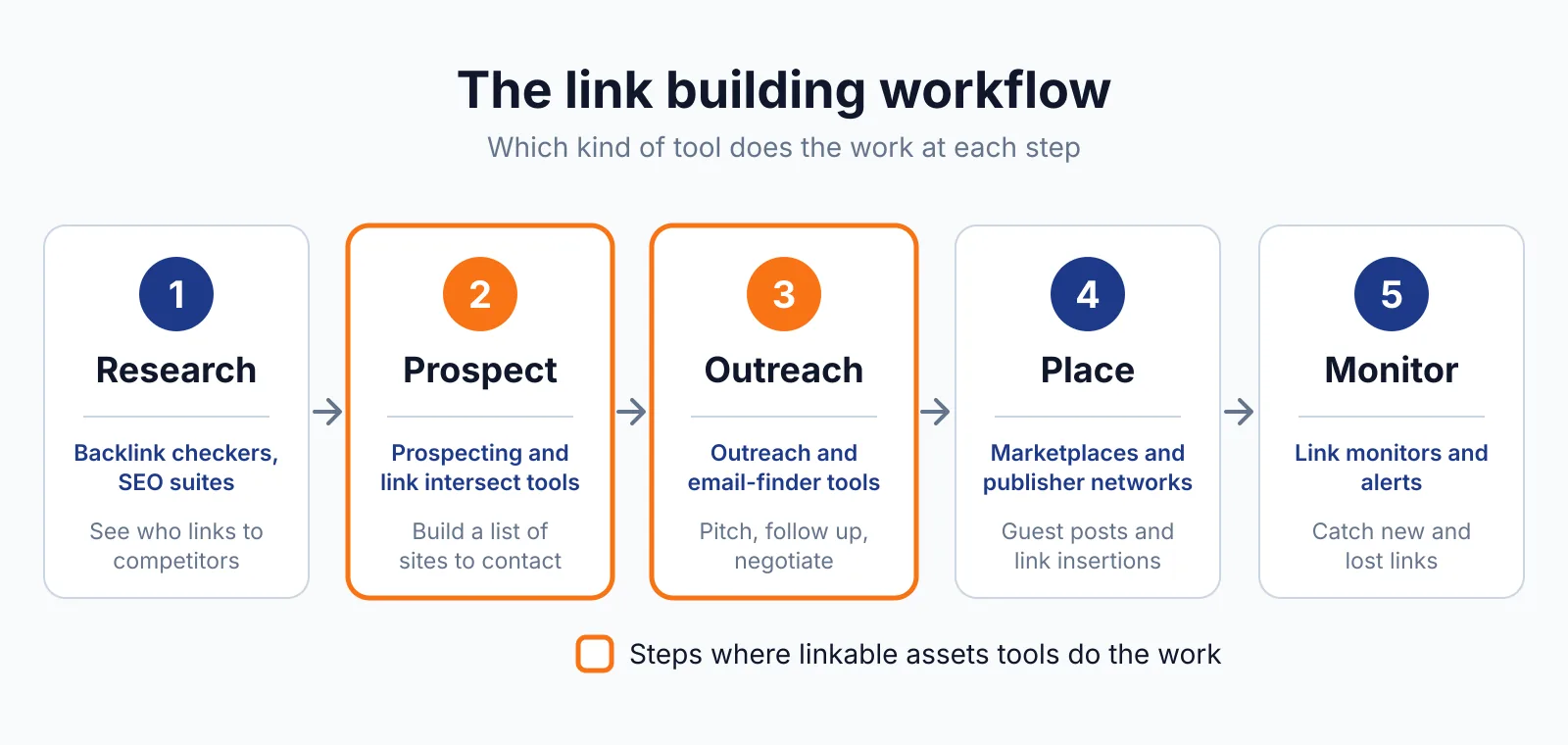
Piktochart is a visual communication platform for infographics, reports, presentations, documents, print materials, social graphics and video. It fits link building as a maker of linkable assets. Piktochart itself buys, places or guarantees no links.
TL;DR
- Piktochart starts free at $0, with Pro at $10 and Business at $17 per member a month billed annually, checked November 2026.
- The free plan covers unlimited visual projects, with only 2 PNG downloads ever and no PDF or PowerPoint downloads.
- Pikto AI Studio builds visuals from a prompt, with charts, maps, diagrams and tables in the same editor.
Quick facts
| Fact | Detail |
|---|---|
| What it does | Visual platform for infographics, reports and charts |
| Best for | Content teams that need infographics without a design team |
| Starting price | $0 free; paid from $10 a month, billed annually |
| Free option | Free plan, $0, permanent |
| Website | piktochart.com |
| Checked | November 2026 |
What Piktochart does
Turn a prompt into an infographic
Pikto AI Studio is the AI design assistant in Piktochart, and it builds a visual from a text prompt, including AI video through Sora 2 and Veo 3.1. You can also start from a template, then customise charts, maps and tables.
For example, a team can chart a small survey result in Piktochart and publish it with the numbers in text. Other sites can then link to the post as the source, as a cited post on Dev.to can send readers back to the source.
Build charts, maps and reports in one place
Piktochart covers charts such as pie, bar and pictographs, plus interactive maps, diagrams and tables. Data can come from a CSV import or live from Google Sheets.
Publish, embed and track a visual
Piktochart lets you download a visual or publish and embed it on a website, with social media publishing in the same tool. You can track traffic on published visuals. Team work runs in workspaces, with comments, folders and reusable team templates.
A team can embed a chart in a blog post and share the same visual on social channels. Tracking shows traffic, not links, so you still need a backlink checker to see who linked to the page. PDF and PowerPoint downloads start at Business, not Pro.
Pricing
Piktochart runs from $0 to a custom Enterprise plan, checked November 2026.
| Plan | Price | Key points |
|---|---|---|
| Free | $0 | 1 to 4 members, 60 AI credits a month, 2 PNG downloads in total |
| Pro | $10 a month billed annually, $15 monthly | Unlimited PNG downloads, 500 AI credits a month, 100 GB storage |
| Business | $17 a month billed annually, $20 monthly | PDF and PowerPoint downloads, full Brand Kit, 1,000 AI credits |
| Enterprise | Custom, 101 plus members | Personalised onboarding, custom templates, SLA and SSO |
Education costs $39.99 per member a year on a special Pro plan, and Nonprofit costs $60 per member a year for registered nonprofits. Refunds are generally not given and are reviewed case by case. A team of five on Pro billed annually pays $600 a year. See the Piktochart pricing page.
Pick it if
- You need infographics and reports without a full design team.
- You want AI help to draft a visual from a prompt.
- You need charts, maps and tables in one editor.
Not a fit if
- You only need PDF or PowerPoint export, since that starts at Business.
- You need more than 4 members on a free plan.
- You want a tool that finds link prospects, since Piktochart does neither.
Alternatives
Alternatives include Visme, Venngage and Datawrapper.
| Tool | Why people switch | Pricing |
|---|---|---|
| Visme | Wider range of content, with presentations and video | Check current pricing on their site |
| Venngage | Stronger focus on accessible infographics | Check current pricing on their site |
| Datawrapper | Cleaner charts for newsrooms | Check current pricing on their site |
FAQ
Does Piktochart give backlinks?
No. Piktochart buys, places or guarantees no links. An infographic you publish on your own site can earn links when other sites cite it, while the tool itself adds no link to your site. If you buy a link for ranking, Google says it needs rel="sponsored" or rel="nofollow", as set out in Google Search Central.
How many free downloads does Piktochart allow?
Two PNG downloads in total on the free plan, and that allowance does not refresh. The free plan gives no PDF or PowerPoint downloads at all. Pro adds unlimited PNG downloads, while PDF and PowerPoint downloads start at Business.
Is Piktochart good for link building?
It makes the visual asset that other sites cite, such as an infographic with original data. That asset still needs a page worth linking to, with the data in text. For help, see our SaaS link building services and our guest posting services. Check costs with our price checker, and read how Hashnode links work.
Next step
Start free, build one infographic with your own data, and publish it on your own site. Talk to us through our contact page.

The BacklinkPrice Team researches backlink prices, publisher sites and link building tools. We check prices and plans against each provider's own pages and date them, so you know how current the numbers are.
More from BacklinkPrice TeamRelated guides